---
title: BioC Connection
description: Learn how to connect the BioC database in Simvia and retrieve certification data automatically using the BioC identifier.
---
[Skip to content](https://helpcenter.simvia.com/knowledge-base/bioc-connection#main-content)
English
Show submenu for translations
[](https://helpcenter.simvia.com/knowledge-base?hsLang=en)
Open main navigation
Close main navigation
- English
Show submenu for translations
This is a search field with an auto-suggest feature attached.
- There are no suggestions because the search field is empty.
1. [Help Center](https://helpcenter.simvia.com/knowledge-base?hsLang=en)
2. [Connections](https://helpcenter.simvia.com/knowledge-base/connections?hsLang=en)
3. [Certification Databases](https://helpcenter.simvia.com/knowledge-base/connections?hsLang=en#certification-databases)
# BioC Connection
#### 1. What is BioC?
BioC is a German-based database that aggregates **organic certificates** from multiple certification bodies.
It mainly applies to the German market and related organic standards.
BioC includes certificates from:
- Biokreis
- Bioland
- Biopark
- Demeter
- ECOLAND
- ECOVIN
- Gäa
- Naturland
- Verbund Ökohöfe
BioC serves as a central source for verified organic certification data across these standards.
**Please note:** BioC may also contain TRACES certificates. However, since Simvia offers a dedicated native TRACES connection, TRACES certificates are not retrieved via the BioC connection. For TRACES data, please use the separate TRACES connection.
---
#### 2. What can you do with BioC?
By connecting BioC to Simvia, you can:
- Automatically retrieve organic certificates
- View certificate status for connected organisations
- Store expired certificates for historical tracking
- Monitor certificate changes
- Reduce manual document collection
This supports more reliable and efficient organic compliance management.
---
#### 3. How to set up the BioC connection
Setting up BioC consists of **two required parts**:
---
### Part 1 – Obtain a BioC account and API key
To use the BioC connection, you must have an official **BioC account**.
BioC charges **€75 per year** for database and API access.
This subscription is managed directly with BioC.
Once you have an account:
1. Log in to your BioC account
2. Go to your account settings
3. Generate an **API key**
The API key is required to connect BioC to Simvia.
---
### Part 2 – Connect BioC in Simvia (one-time setup)
This only needs to be done **once per account**.
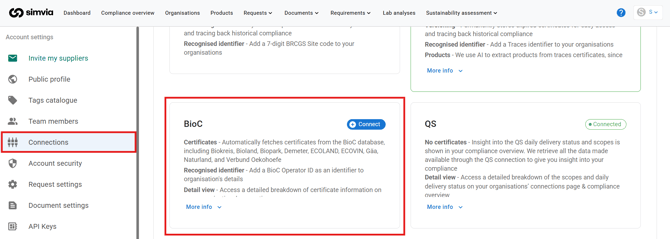
1. Go to **Account settings**
2. Open **Connections**
3. Select **Databases → BioC**
4. Enter your BioC API key
5. Confirm the connection
Once connected, Simvia can retrieve certificate data automatically.
---
### Part 3 – Add the BioC identifier to organisations
To retrieve certificate data, each organisation must have a valid:
**BioC Operator ID**
You must add this identifier to:
- All existing organisations you want BioC data for
- All newly created organisations
To add the identifier:
1. Open the organisation in Simvia
2. Go to **Unique identifiers**
3. Add **BioC Operator ID**
4. Enter the correct identifier
5. Save
Without a valid BioC Operator ID, no certificate data can be retrieved for that organisation.
---
#### 4. Where to find the identifier
BioC uses the **BioC Operator ID** to identify certified organisations.
This identifier:
- Is assigned within the BioC system
- Can be found in your BioC account
- May also appear on the certificate itself
If needed, you can search directly in the BioC database.
---
#### 5. How data is retrieved
After:
- The BioC database is connected, and
- The organisation exists in the BioC system
Simvia will automatically retrieve available certificate data.
The BioC sync runs **daily at 00:00**, meaning new or updated certificate data is refreshed automatically.
No manual request is required.
---
#### 6. What data is retrieved
When available, Simvia retrieves:
- Certificate document
- Certificate status
- Validity dates
- Operator information
- Certified products
Certified products can be viewed in the organisation’s **Connections** tab.
Expired certificates remain stored for versioning and historical compliance tracking.
---
#### 7. How to access and use the data
Retrieved BioC data can be found in:
- The organisation’s **Connections** page
- **Documents → Supplier documents**
You can use this data to:
- Verify organic certification validity
- Track expiration dates
- Maintain audit-ready documentation
- Monitor status changes
---
#### 8. BioC Monitoring (Optional)
In addition to retrieving certificates, you can enable **BioC Monitoring**.
When monitoring is enabled, you will receive **email notifications** when:
- A certificate expires
- A certificate status changes
This helps you stay proactively informed about certification changes without manually checking the system.
---
### How to enable BioC Monitoring
BioC Monitoring can be activated from the **Connection Settings** page.
To enable monitoring:
1. Go to **Account settings**
2. Open **Connections**
3. Select **Databases → BioC**
4. Open the **Connection Settings**
5. Enable **Monitoring**
6. Save your changes
Once activated, email notifications will be sent automatically when certificate updates occur.
#### 9. Important to know
- A valid BioC subscription is required
- The API key only needs to be configured once per account
- Data is refreshed daily at 00:00
- Only certificates available in the BioC database can be retrieved
- Data availability depends on BioC’s maintained records
- BioC Monitoring comes at **additional cost**
- Monitoring must be activated separately from the standard BioC connection
- Notifications depend on updates provided by BioC
If certificates are missing or unclear, they should be verified directly with BioC or the relevant certification body.
- [Getting Started](https://helpcenter.simvia.com/knowledge-base/getting-started?hsLang=en#main-content)
- [About Simvia](https://helpcenter.simvia.com/knowledge-base/getting-started?hsLang=en#about-simvia)
- [Navigating the Platform](https://helpcenter.simvia.com/knowledge-base/getting-started?hsLang=en#navigating-the-platform)
- [Account & Access](https://helpcenter.simvia.com/knowledge-base/getting-started?hsLang=en#account-access)
- [Supply Chain Approval (SCA)](https://helpcenter.simvia.com/knowledge-base/supply-chain-approval-sca?hsLang=en#main-content)
- [Dashboard](https://helpcenter.simvia.com/knowledge-base/supply-chain-approval-sca?hsLang=en#dashboard)
- [Compliance Overview](https://helpcenter.simvia.com/knowledge-base/supply-chain-approval-sca?hsLang=en#compliance-overview)
- [Organisations](https://helpcenter.simvia.com/knowledge-base/supply-chain-approval-sca?hsLang=en#organisations)
- [Products](https://helpcenter.simvia.com/knowledge-base/supply-chain-approval-sca?hsLang=en#products)
- [Requests](https://helpcenter.simvia.com/knowledge-base/supply-chain-approval-sca?hsLang=en#requests)
- [Documents](https://helpcenter.simvia.com/knowledge-base/supply-chain-approval-sca?hsLang=en#documents)
- [Requirements](https://helpcenter.simvia.com/knowledge-base/supply-chain-approval-sca?hsLang=en#requirements)
- [PPWR](https://helpcenter.simvia.com/knowledge-base/ppwr?hsLang=en)
- [Sustainability Risk Assessment (SRA)](https://helpcenter.simvia.com/knowledge-base/sustainability-risk-assessment-sra?hsLang=en)
- [Connections](https://helpcenter.simvia.com/knowledge-base/connections?hsLang=en#main-content)
- [Certification Databases](https://helpcenter.simvia.com/knowledge-base/connections?hsLang=en#certification-databases)
- [Laboratory Integrations](https://helpcenter.simvia.com/knowledge-base/connections?hsLang=en#laboratory-integrations)
- [Updates](https://helpcenter.simvia.com/knowledge-base/updates?hsLang=en#main-content)
- [Release Notes 2026](https://helpcenter.simvia.com/knowledge-base/updates?hsLang=en#release-notes-2026)
- [Release Notes 2025](https://helpcenter.simvia.com/knowledge-base/updates?hsLang=en#release-notes-2025)
[](https://www.simvia.com/)
Copyright © 2026, Simvia