---
title: Creating a Custom Risk Assessment
description: Learn how to create a custom risk assessment to evaluate ESG risks for specific product and country combinations in your supply chain.
---
[Skip to content](https://helpcenter.simvia.com/knowledge-base/creating-a-custom-risk-assessment#main-content)
English
Show submenu for translations
[](https://helpcenter.simvia.com/knowledge-base?hsLang=en)
Open main navigation
Close main navigation
- English
Show submenu for translations
This is a search field with an auto-suggest feature attached.
- There are no suggestions because the search field is empty.
1. [Help Center](https://helpcenter.simvia.com/knowledge-base?hsLang=en)
2. [Sustainability Risk Assessment (SRA)](https://helpcenter.simvia.com/knowledge-base/sustainability-risk-assessment-sra?hsLang=en)
# Creating a Custom Risk Assessment
The **Custom Risk Assessment** module allows you to create tailored risk analyses for specific product and country combinations within your supply chain.
This helps you proactively identify and mitigate potential **ESG (Environmental, Social, and Governance) risks** based on your actual sourcing volumes.
---
#### Creating a New Assessment
To create a custom assessment:
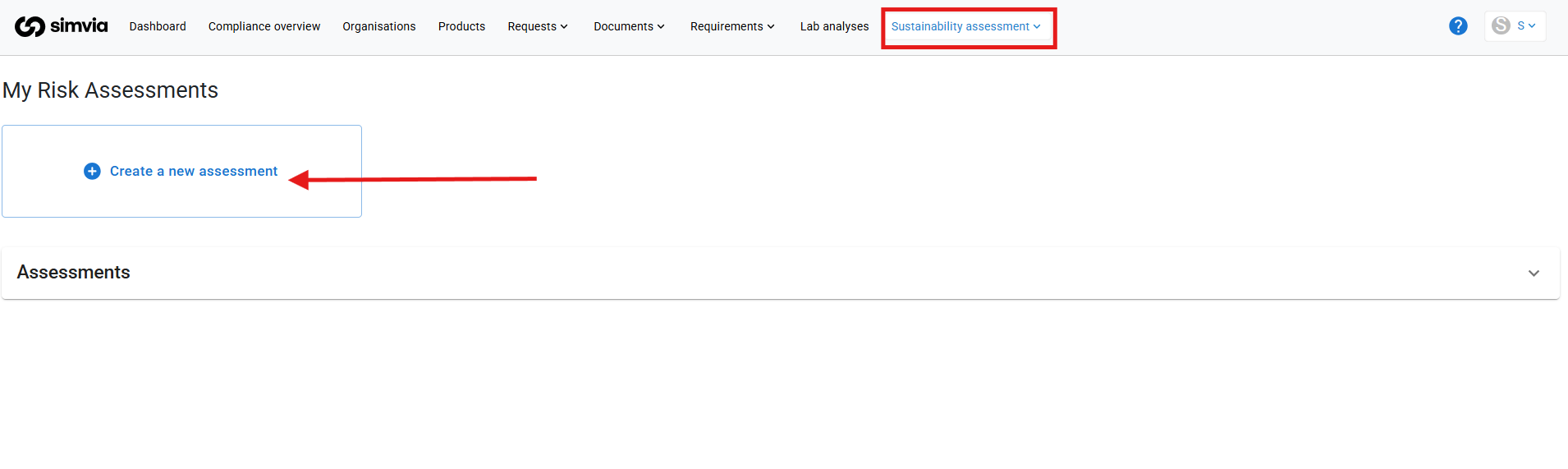
1. Click **Create new assessment**
2. Enter:
- **Product name**
- **Country of origin**
- **Net volume** (in tonnes)
3. Click **Create
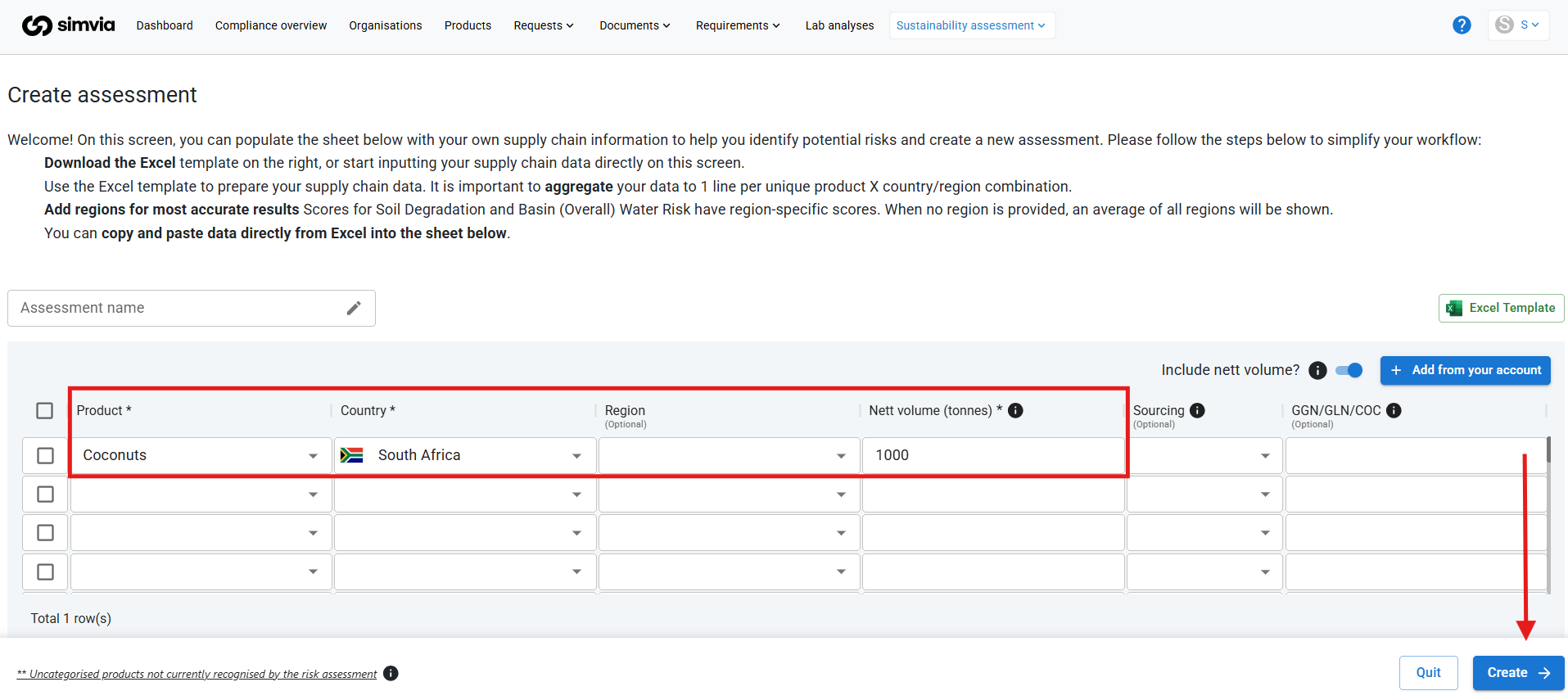**
The system will generate a risk overview based on the selected product-country combination.
---
#### Viewing the Results
Click **View** to open the full assessment.
You will see a structured overview displaying:
- Risk scores per **product**
- Risk scores per **country**
- Risk levels per **risk dimension**
- Aggregated scores per **risk category** (Environmental, Social, Governance)
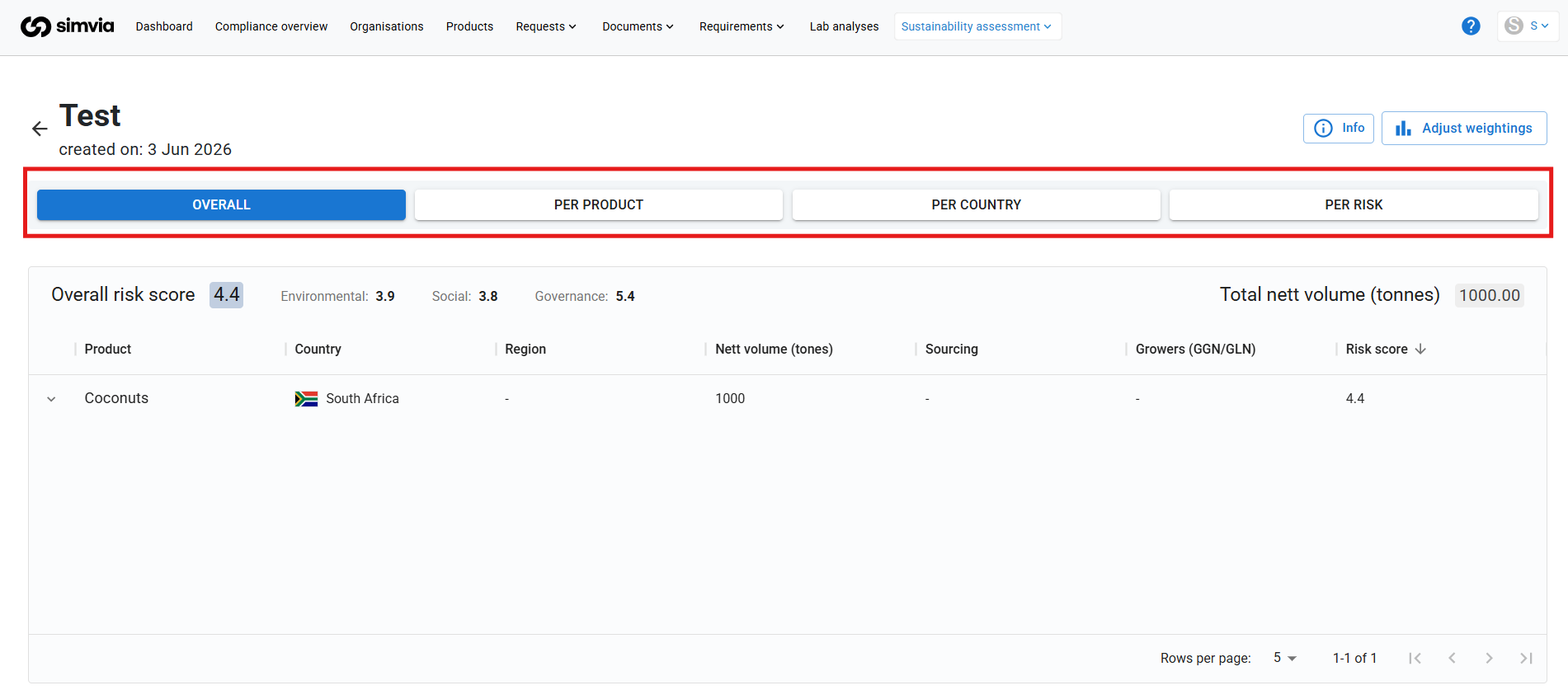
This allows you to quickly identify high-risk areas and prioritise follow-up actions.
---
#### Adjusting Risk Weightings
By default, all risk categories are weighted equally.
However, you can adjust the **weighting per risk category** if certain ESG dimensions are more relevant to your organisation.
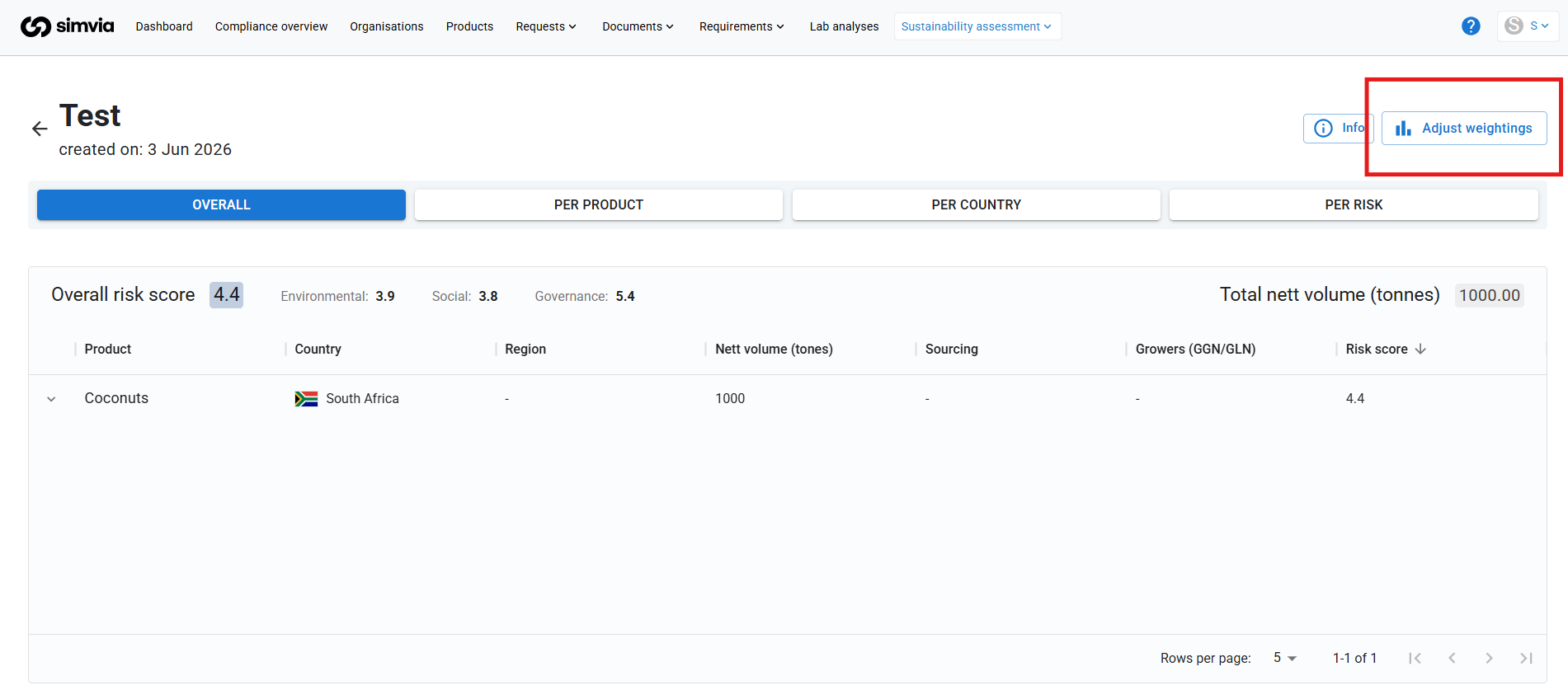
For example:
- Increase environmental weighting if water risk is a strategic priority
- Increase social weighting for human rights-focused sourcing
- Increase governance weighting for politically sensitive regions
The overall risk score will automatically recalculate based on your selected weightings.
---
#### Why Use Custom Risk Assessments?
Custom assessments are useful when:
- Evaluating new sourcing countries
- Preparing sustainability reports
- Conducting due diligence
- Supporting buyer-specific risk requirements
- Prioritising audits or corrective actions
This module gives you a data-driven foundation to make informed sourcing decisions and strengthen supply chain transparency.
- [Getting Started](https://helpcenter.simvia.com/knowledge-base/getting-started?hsLang=en#main-content)
- [About Simvia](https://helpcenter.simvia.com/knowledge-base/getting-started?hsLang=en#about-simvia)
- [Navigating the Platform](https://helpcenter.simvia.com/knowledge-base/getting-started?hsLang=en#navigating-the-platform)
- [Account & Access](https://helpcenter.simvia.com/knowledge-base/getting-started?hsLang=en#account-access)
- [Supply Chain Approval (SCA)](https://helpcenter.simvia.com/knowledge-base/supply-chain-approval-sca?hsLang=en#main-content)
- [Dashboard](https://helpcenter.simvia.com/knowledge-base/supply-chain-approval-sca?hsLang=en#dashboard)
- [Compliance Overview](https://helpcenter.simvia.com/knowledge-base/supply-chain-approval-sca?hsLang=en#compliance-overview)
- [Organisations](https://helpcenter.simvia.com/knowledge-base/supply-chain-approval-sca?hsLang=en#organisations)
- [Products](https://helpcenter.simvia.com/knowledge-base/supply-chain-approval-sca?hsLang=en#products)
- [Requests](https://helpcenter.simvia.com/knowledge-base/supply-chain-approval-sca?hsLang=en#requests)
- [Documents](https://helpcenter.simvia.com/knowledge-base/supply-chain-approval-sca?hsLang=en#documents)
- [Requirements](https://helpcenter.simvia.com/knowledge-base/supply-chain-approval-sca?hsLang=en#requirements)
- [PPWR](https://helpcenter.simvia.com/knowledge-base/ppwr?hsLang=en)
- [Sustainability Risk Assessment (SRA)](https://helpcenter.simvia.com/knowledge-base/sustainability-risk-assessment-sra?hsLang=en)
- [Connections](https://helpcenter.simvia.com/knowledge-base/connections?hsLang=en#main-content)
- [Certification Databases](https://helpcenter.simvia.com/knowledge-base/connections?hsLang=en#certification-databases)
- [Laboratory Integrations](https://helpcenter.simvia.com/knowledge-base/connections?hsLang=en#laboratory-integrations)
- [Updates](https://helpcenter.simvia.com/knowledge-base/updates?hsLang=en#main-content)
- [Release Notes 2026](https://helpcenter.simvia.com/knowledge-base/updates?hsLang=en#release-notes-2026)
- [Release Notes 2025](https://helpcenter.simvia.com/knowledge-base/updates?hsLang=en#release-notes-2025)
[](https://www.simvia.com/)
Copyright © 2026, Simvia