---
title: Database Connections
description: Learn how database connections retrieve supplier certification data automatically and generate database extract documents from sources such as GLOBALG.A.P., BRCGS, QS, and FSSC 22000.
---
[Skip to content](https://helpcenter.simvia.com/knowledge-base/database-connections#main-content)
English
Show submenu for translations
[](https://helpcenter.simvia.com/knowledge-base?hsLang=en)
Open main navigation
Close main navigation
- English
Show submenu for translations
This is a search field with an auto-suggest feature attached.
- There are no suggestions because the search field is empty.
1. [Help Center](https://helpcenter.simvia.com/knowledge-base?hsLang=en)
2. [Connections](https://helpcenter.simvia.com/knowledge-base/connections?hsLang=en)
3. [Certification Databases](https://helpcenter.simvia.com/knowledge-base/connections?hsLang=en#certification-databases)
# Database Connections
#### Overview
Simvia is connected to multiple external **certification databases**. These connections allow the platform to automatically retrieve public certification data and generate **database extract documents** in your account.
This reduces the need for manual document uploads and ensures that certification information remains **up to date and visible across your supply chain**.
By connecting certification databases, Simvia helps companies maintain a clearer overview of supplier certifications and compliance status.
---
### Why Database Connections Are Important
Managing supplier certifications manually can be time-consuming and prone to outdated information. Database connections automate this process by retrieving certification data directly from official sources.
Using database connections provides several benefits:
- Automatic retrieval of certification data
- Reduced need for manual document collection
- Improved visibility of supplier certification status
- Better monitoring of compliance across the supply chain
To maximize the benefits, it is recommended to add as many supplier identifiers as possible, such as **GGN, QS ID, or FSSC COID**.
When identifiers are available, Simvia can automatically retrieve certification data from supported databases.
---
### Available Database Connections
Simvia currently supports several certification databases. Each connection requires a **specific identifier** that allows the platform to retrieve certification information.
---
#### GLOBALG.A.P.
GLOBALG.A.P. is a widely used certification standard in agricultural supply chains.
### Required identifiers
- GGN
- GGL
- CoC
### Documents that may be generated
- Database extract IFA
- Database extract GRASP
- SPRING Audit Report
- GLOBALG.A.P. add-ons
- AH-DLL Grow
- Beter voor Natuur & Boer
- SIZA Environmental
- TR4 BioSecurity
- Biodiversity add-on
- Food Safety Modernization add-on
- SPRING add-on
Users can check GLOBALG.A.P. status by opening an organisation and navigating to the **Connection tab**, or by reviewing generated documents in **Documents**.
---
#### FSSC 22000
FSSC 22000 is a globally recognized food safety certification scheme.
### Required identifier
**FSSC 22000 COID**
Example format:
**FSSC COID \[XXX-0-0000-000000\]**
### Data retrieved may include
- Name of the certified organisation
- Certificate valid from date
- Certificate valid to date
- Official certificate number
- GFSI recognised status
- Certificate status
- Multisite indicator
- Food chain category
---
#### QS
QS is a certification system used primarily in the German food supply chain.
### Required identifier
**QS Location ID**
### Data retrieved may include
- Certificate scope
- Certificate status
- Daily delivery status
---
#### PlanetProof
PlanetProof is a sustainability certification used mainly in the Netherlands.
### Required identifier
**PlanetProof registration number**
### Documents generated
- PlanetProof database extract
---
#### BRCGS
BRCGS is a global food safety certification used by many manufacturers and retailers.
### Required identifier
**BRCGS Site Code (7 digits)**
### Documents generated
- BRCGS database extract
---
#### BioC
BioC is a certification database used for organic and sustainability related certifications.
### Required identifier
**BioC registration identifier**
### Documents generated
- BioC database extract
---
### How to Find Database Extract Documents
Database extract documents can be viewed directly within Simvia.
To find them:
1. Go to **Documents → Supplier documents**
2. Use the filter **Document type contains "Database extract"**
Alternatively, certification information may also be visible directly on the **organisation page** under the relevant database connection tab.
---
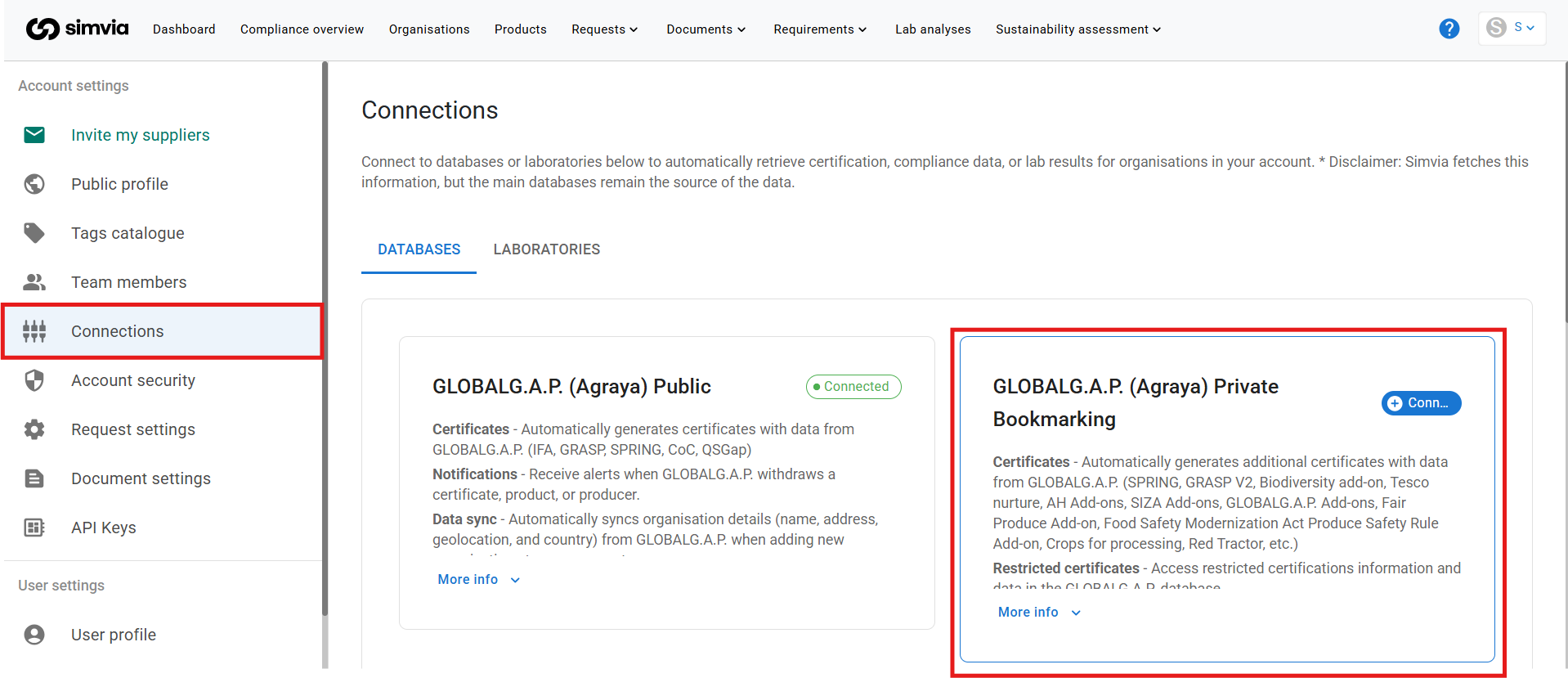
### GLOBALG.A.P. Private Bookmarking
If your organisation has a **GLOBALG.A.P. Private Bookmarking account**, additional certification data can be retrieved.
Examples include:
- Tesco Nurture
- GRASP status details
- AH add-on
- SIZA add-ons
- Additional GLOBALG.A.P. add-ons
To activate this connection:
1. Go to **Account settings → Connections**
2. Enter your Private Bookmarking credentials
---
### Support
Database extracts help maintain accurate certification oversight without repeatedly requesting documents from suppliers.
If you need assistance setting up a connection, contact support@simvia.com
- [Getting Started](https://helpcenter.simvia.com/knowledge-base/getting-started?hsLang=en#main-content)
- [About Simvia](https://helpcenter.simvia.com/knowledge-base/getting-started?hsLang=en#about-simvia)
- [Navigating the Platform](https://helpcenter.simvia.com/knowledge-base/getting-started?hsLang=en#navigating-the-platform)
- [Account & Access](https://helpcenter.simvia.com/knowledge-base/getting-started?hsLang=en#account-access)
- [Supply Chain Approval (SCA)](https://helpcenter.simvia.com/knowledge-base/supply-chain-approval-sca?hsLang=en#main-content)
- [Dashboard](https://helpcenter.simvia.com/knowledge-base/supply-chain-approval-sca?hsLang=en#dashboard)
- [Compliance Overview](https://helpcenter.simvia.com/knowledge-base/supply-chain-approval-sca?hsLang=en#compliance-overview)
- [Organisations](https://helpcenter.simvia.com/knowledge-base/supply-chain-approval-sca?hsLang=en#organisations)
- [Products](https://helpcenter.simvia.com/knowledge-base/supply-chain-approval-sca?hsLang=en#products)
- [Requests](https://helpcenter.simvia.com/knowledge-base/supply-chain-approval-sca?hsLang=en#requests)
- [Documents](https://helpcenter.simvia.com/knowledge-base/supply-chain-approval-sca?hsLang=en#documents)
- [Requirements](https://helpcenter.simvia.com/knowledge-base/supply-chain-approval-sca?hsLang=en#requirements)
- [PPWR](https://helpcenter.simvia.com/knowledge-base/ppwr?hsLang=en)
- [Sustainability Risk Assessment (SRA)](https://helpcenter.simvia.com/knowledge-base/sustainability-risk-assessment-sra?hsLang=en)
- [Connections](https://helpcenter.simvia.com/knowledge-base/connections?hsLang=en#main-content)
- [Certification Databases](https://helpcenter.simvia.com/knowledge-base/connections?hsLang=en#certification-databases)
- [Laboratory Integrations](https://helpcenter.simvia.com/knowledge-base/connections?hsLang=en#laboratory-integrations)
- [Updates](https://helpcenter.simvia.com/knowledge-base/updates?hsLang=en#main-content)
- [Release Notes 2026](https://helpcenter.simvia.com/knowledge-base/updates?hsLang=en#release-notes-2026)
- [Release Notes 2025](https://helpcenter.simvia.com/knowledge-base/updates?hsLang=en#release-notes-2025)
[](https://www.simvia.com/)
Copyright © 2026, Simvia