---
title: Document Upload Methods
description: Learn the different document upload methods available in Simvia, including single upload, bulk upload, database extracts, and automatic requests based on requirement rules.
---
[Skip to content](https://helpcenter.simvia.com/knowledge-base/document-upload-methods#main-content)
English
Show submenu for translations
[](https://helpcenter.simvia.com/knowledge-base?hsLang=en)
Open main navigation
Close main navigation
- English
Show submenu for translations
This is a search field with an auto-suggest feature attached.
- There are no suggestions because the search field is empty.
1. [Help Center](https://helpcenter.simvia.com/knowledge-base?hsLang=en)
2. [Supply Chain Approval (SCA)](https://helpcenter.simvia.com/knowledge-base/supply-chain-approval-sca?hsLang=en)
3. [Documents](https://helpcenter.simvia.com/knowledge-base/supply-chain-approval-sca?hsLang=en#documents)
# Document Upload Methods
Once your organisations are set up, the next step is to enrich your account with the required documents.
There are **four ways** to add documents to your account:
1. **Single upload**
2. **Bulk upload**
3. **Database extracts**
4. **Requests based on requirement rules**
---
### 1. Single Upload
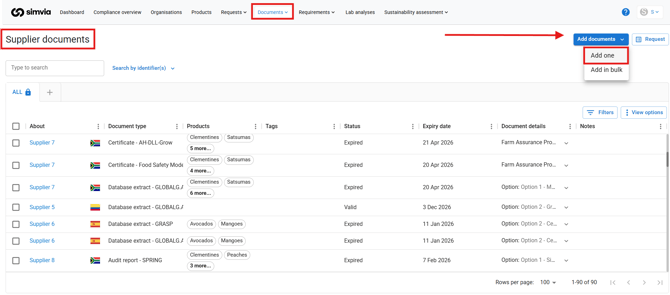
Single upload allows you to add one document at a time.
This method is best when:
- You only need to upload a few documents
- You receive documents individually by email
- You want to manually review and upload specific files
You can upload documents from the **Own documents** or **Supplier documents** page.
---
### 2. Bulk Upload
Bulk upload allows you to add multiple documents at once.
This is recommended when:
- You are starting with a large number of existing certificates
- You want to migrate documents from another system
- You want to save time during onboarding
You can upload multiple files and assign document types, expiry dates, and other details in one
process.

---
### 3. Database Extract
Database extracts automatically retrieve certificates from connected certification databases.
Examples include:
- [**GLOBALG.A.P.**](https://helpcenter.simvia.com/knowledge-base/globalg.a.p.-agraya-connection?hsLang=en)
- [**BRCGS**](https://helpcenter.simvia.com/knowledge-base/brcgs-connection?hsLang=en)
- **[FSSC](https://helpcenter.simvia.com/knowledge-base/fssc-22000-connection?hsLang=en) 22000**
- [**QS**](https://helpcenter.simvia.com/knowledge-base/qs-connection?hsLang=en)
- [**PlanetProof**](https://helpcenter.simvia.com/knowledge-base/planetproof-connection?hsLang=en)
- **[TRACES](https://helpcenter.simvia.com/knowledge-base/traces-eu-connection?hsLang=en)**
- [**BioC**](https://helpcenter.simvia.com/knowledge-base/bioc-connection?hsLang=en)
If the correct identifier (such as GGN or COID) is added to an organisation and the connection is activated, the system can automatically fetch certification data and store it as a database extract.
This reduces manual uploads and improves data accuracy.

---
### 4. Requests Based on Requirement Rules
The fourth method of collecting documents is through **automatic requests generated by requirement rules**.
Once requirement rules are configured, the system:
- Checks document availability daily
- Identifies missing or expired documents
- Sends document requests automatically
This method ensures ongoing compliance without manual follow-up.
---
### Best Practice
During onboarding:
- Start by uploading existing documents (single or bulk upload).
- Activate relevant database connections.
- Then configure requirement rules to automate future document collection.
Using these methods together ensures a complete and up-to-date document library.
- [Getting Started](https://helpcenter.simvia.com/knowledge-base/getting-started?hsLang=en#main-content)
- [About Simvia](https://helpcenter.simvia.com/knowledge-base/getting-started?hsLang=en#about-simvia)
- [Navigating the Platform](https://helpcenter.simvia.com/knowledge-base/getting-started?hsLang=en#navigating-the-platform)
- [Account & Access](https://helpcenter.simvia.com/knowledge-base/getting-started?hsLang=en#account-access)
- [Supply Chain Approval (SCA)](https://helpcenter.simvia.com/knowledge-base/supply-chain-approval-sca?hsLang=en#main-content)
- [Dashboard](https://helpcenter.simvia.com/knowledge-base/supply-chain-approval-sca?hsLang=en#dashboard)
- [Compliance Overview](https://helpcenter.simvia.com/knowledge-base/supply-chain-approval-sca?hsLang=en#compliance-overview)
- [Organisations](https://helpcenter.simvia.com/knowledge-base/supply-chain-approval-sca?hsLang=en#organisations)
- [Products](https://helpcenter.simvia.com/knowledge-base/supply-chain-approval-sca?hsLang=en#products)
- [Requests](https://helpcenter.simvia.com/knowledge-base/supply-chain-approval-sca?hsLang=en#requests)
- [Documents](https://helpcenter.simvia.com/knowledge-base/supply-chain-approval-sca?hsLang=en#documents)
- [Requirements](https://helpcenter.simvia.com/knowledge-base/supply-chain-approval-sca?hsLang=en#requirements)
- [PPWR](https://helpcenter.simvia.com/knowledge-base/ppwr?hsLang=en)
- [Sustainability Risk Assessment (SRA)](https://helpcenter.simvia.com/knowledge-base/sustainability-risk-assessment-sra?hsLang=en)
- [Connections](https://helpcenter.simvia.com/knowledge-base/connections?hsLang=en#main-content)
- [Certification Databases](https://helpcenter.simvia.com/knowledge-base/connections?hsLang=en#certification-databases)
- [Laboratory Integrations](https://helpcenter.simvia.com/knowledge-base/connections?hsLang=en#laboratory-integrations)
- [Updates](https://helpcenter.simvia.com/knowledge-base/updates?hsLang=en#main-content)
- [Release Notes 2026](https://helpcenter.simvia.com/knowledge-base/updates?hsLang=en#release-notes-2026)
- [Release Notes 2025](https://helpcenter.simvia.com/knowledge-base/updates?hsLang=en#release-notes-2025)
[](https://www.simvia.com/)
Copyright © 2026, Simvia