---
title: Eurofins Connection
description: Learn how to connect the Eurofins laboratory system in Simvia to automatically retrieve laboratory analysis results linked to your Eurofins account.
---
[Skip to content](https://helpcenter.simvia.com/knowledge-base/eurofins-connection#main-content)
English
Show submenu for translations
[](https://helpcenter.simvia.com/knowledge-base?hsLang=en)
Open main navigation
Close main navigation
- English
Show submenu for translations
This is a search field with an auto-suggest feature attached.
- There are no suggestions because the search field is empty.
1. [Help Center](https://helpcenter.simvia.com/knowledge-base?hsLang=en)
2. [Connections](https://helpcenter.simvia.com/knowledge-base/connections?hsLang=en)
3. [Laboratory Integrations](https://helpcenter.simvia.com/knowledge-base/connections?hsLang=en#laboratory-integrations)
# Eurofins Connection
#### 1. What is Eurofins?
Eurofins is an international laboratory network providing analytical testing services, including:
- Residue analyses
- Microbiological testing
- Contaminant testing
- Other laboratory reports
Through the Eurofins connection, Simvia allows you to retrieve and manage laboratory analysis results directly within the platform.
---
#### 2. What can you do with Eurofins?
By connecting Eurofins to Simvia, you can:
- Access laboratory results directly in the platform
- Reduce manual uploads and email exchanges
- Store lab results centrally and traceably
- Support risk analysis and sampling decisions
- Use results for allocation decisions (e.g. product release to customers)
This helps centralise quality and safety data within your supply chain management process.
---
#### 3. How to set up a connection
Setting up Eurofins consists of **two required parts**.
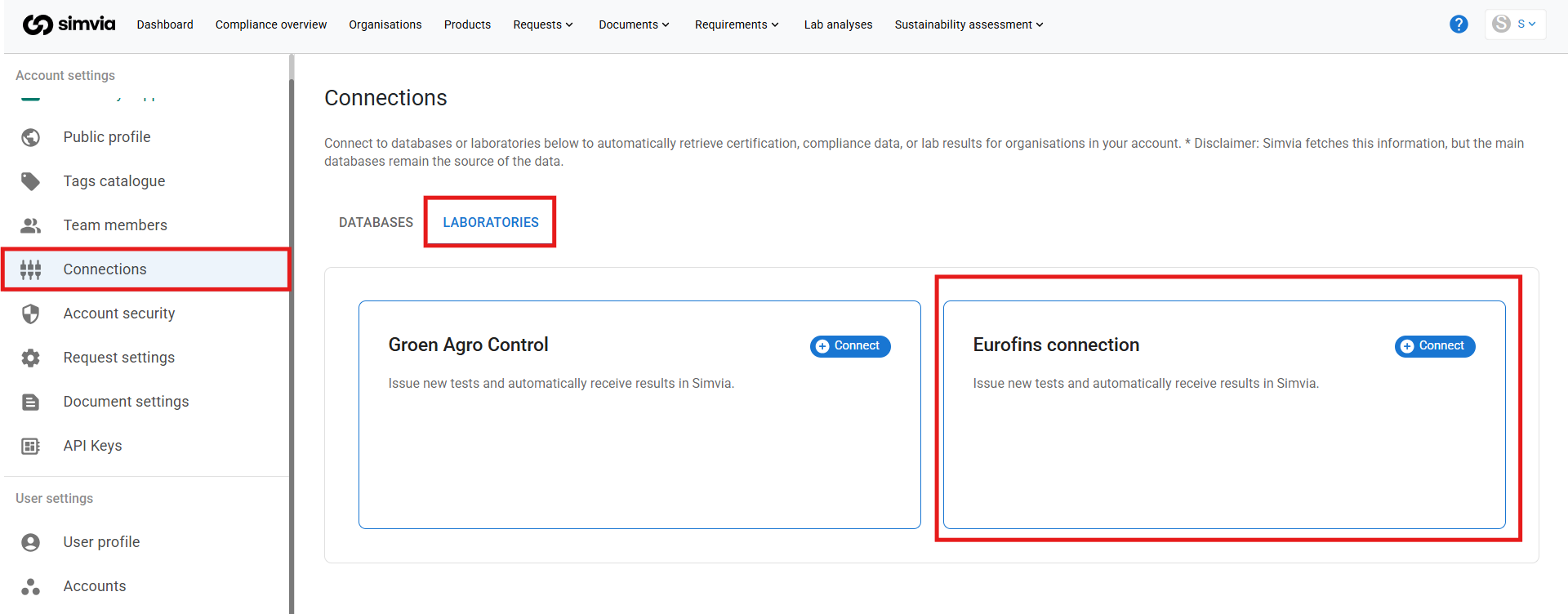
### Step 1 – Create the connection in Simvia
1. Go to **Account settings**
2. Open **Connections**
3. Navigate to **Laboratories**
4. Create a new connection
5. Select **Eurofins
**
---
### Step 2 – Authorise data sharing with Eurofins
Before the connection can be completed, Eurofins must be authorised to share your laboratory results with Simvia.
- Follow the detailed instructions provided during setup
- Grant permission for Eurofins to share your analysis data
This step ensures secure data transfer.
---
### Step 3 – Enter your Eurofins credentials
Once permission is granted, Eurofins will provide you with unique login credentials.
- Enter these credentials in the connection setup
- Confirm the connection
After activation, lab results will become available automatically.
---
#### 4. Where to find the identifier
No organisation-level identifier (such as a certificate number) needs to be added in Simvia.
Access is based on:
- Your authorised Eurofins account
- The credentials provided by Eurofins
If required, Eurofins can confirm how your laboratory account is structured.
---
#### 5. How to retrieve data for an organisation
Once the connection is active and authorisation is completed:
- Laboratory results linked to your Eurofins account are automatically retrieved
- No manual document upload is required
- New laboratory data is retrieved automatically every 15 minutes
Results are matched and made available within Simvia for review and management.
---
#### 6. What data is retrieved
When available, Simvia retrieves:
- Laboratory analysis reports
- Test results (e.g. residue levels, microbiological findings)
- Sampling and analysis details
The available data depends on the analyses performed by Eurofins and linked to your account.
---
#### 7. How to access and use the data
Retrieved laboratory results can be accessed within Simvia, where you can:
- Review test results
- Use them in quality control processes
- Include them in risk assessments
- Support product approval and allocation decisions
All results remain stored and traceable in your account.
---
#### 8. Important to know
- Eurofins must be authorised to share data before results can be retrieved
- Valid credentials from Eurofins are required
- Data availability depends on the laboratory analyses performed
- Only results linked to your authorised Eurofins account can be retrieved
Results may not always be available immediately, as availability depends on when Eurofins publishes the analyses.
If results are missing or incomplete, verify that:
- Authorisation has been granted
- The correct credentials are used
- The analyses are available in your Eurofins account
For technical issues, contact Simvia Support or your Eurofins representative.
- [Getting Started](https://helpcenter.simvia.com/knowledge-base/getting-started?hsLang=en#main-content)
- [About Simvia](https://helpcenter.simvia.com/knowledge-base/getting-started?hsLang=en#about-simvia)
- [Navigating the Platform](https://helpcenter.simvia.com/knowledge-base/getting-started?hsLang=en#navigating-the-platform)
- [Account & Access](https://helpcenter.simvia.com/knowledge-base/getting-started?hsLang=en#account-access)
- [Supply Chain Approval (SCA)](https://helpcenter.simvia.com/knowledge-base/supply-chain-approval-sca?hsLang=en#main-content)
- [Dashboard](https://helpcenter.simvia.com/knowledge-base/supply-chain-approval-sca?hsLang=en#dashboard)
- [Compliance Overview](https://helpcenter.simvia.com/knowledge-base/supply-chain-approval-sca?hsLang=en#compliance-overview)
- [Organisations](https://helpcenter.simvia.com/knowledge-base/supply-chain-approval-sca?hsLang=en#organisations)
- [Products](https://helpcenter.simvia.com/knowledge-base/supply-chain-approval-sca?hsLang=en#products)
- [Requests](https://helpcenter.simvia.com/knowledge-base/supply-chain-approval-sca?hsLang=en#requests)
- [Documents](https://helpcenter.simvia.com/knowledge-base/supply-chain-approval-sca?hsLang=en#documents)
- [Requirements](https://helpcenter.simvia.com/knowledge-base/supply-chain-approval-sca?hsLang=en#requirements)
- [PPWR](https://helpcenter.simvia.com/knowledge-base/ppwr?hsLang=en)
- [Sustainability Risk Assessment (SRA)](https://helpcenter.simvia.com/knowledge-base/sustainability-risk-assessment-sra?hsLang=en)
- [Connections](https://helpcenter.simvia.com/knowledge-base/connections?hsLang=en#main-content)
- [Certification Databases](https://helpcenter.simvia.com/knowledge-base/connections?hsLang=en#certification-databases)
- [Laboratory Integrations](https://helpcenter.simvia.com/knowledge-base/connections?hsLang=en#laboratory-integrations)
- [Updates](https://helpcenter.simvia.com/knowledge-base/updates?hsLang=en#main-content)
- [Release Notes 2026](https://helpcenter.simvia.com/knowledge-base/updates?hsLang=en#release-notes-2026)
- [Release Notes 2025](https://helpcenter.simvia.com/knowledge-base/updates?hsLang=en#release-notes-2025)
[](https://www.simvia.com/)
Copyright © 2026, Simvia