
Simvia offers two separate connections to the GLOBALG.A.P. (Agraya) database:
- GLOBALG.A.P. (Agraya) Public
- GLOBALG.A.P. (Agraya) Private Bookmarking
Both can be used side by side and provide different levels of data access.
1. What is GLOBALG.A.P. (Agraya)?
GLOBALG.A.P. (Agraya) is the official certification database for GLOBALG.A.P. standards and add-ons.
It contains certificate data for schemes such as:
- IFA (Integrated Farm Assurance)
- GRASP
- SPRING
- CoC (Chain of Custody)
- QSGap
- Various add-ons and retailer-specific standards
Simvia connects directly to GLOBALG.A.P. to retrieve certificate data automatically.
2. What can you do with GLOBALG.A.P.?
By connecting GLOBALG.A.P. to Simvia, you can:
- Automatically generate GLOBALG.A.P. certificates
- Retrieve certificate validity, site and product level data
- Sync organisation details when adding a GGN
- Monitor suspended or cancelled certificates, products, or producers
- Reduce manual certificate collection
This supports automated and reliable compliance monitoring.
3. How to set up the GLOBALG.A.P. connection
There are two possible connections, depending on your needs.
Option A – GLOBALG.A.P. (Agraya) Public
The GLOBALG.A.P. (Agraya) Public connection is automatically active in your Simvia account and does not require login credentials.
This connection cannot be manually connected or disconnected.
Through the Public connection, Simvia retrieves all certificate data that is publicly available in the GLOBALG.A.P. database.
Please note that some certificate data may appear as “Restricted” or “Not available.” This happens when producers or certification bodies limit public visibility of their data.
If you require access to restricted or extended certificate data, you can set up a Private Bookmarking connection using your own GLOBALG.A.P. API credentials (see Option B).
Option B – GLOBALG.A.P. (Agraya) Private Bookmarking
This is an optional, additional connection for extended data access.
Step 1 – Request API credentials from Agraya.
Send a request to:
GLOBALG.A.P. will:
- Locate your organisation in the Supply Chain Portal
- Activate or create an API user
- Provide a temporary API password
API credentials follow this format:
-
Username:
api_scp@[your-organisation-ID].com -
Password:
Temporary password provided by GLOBALG.A.P.
Note: These are separate credentials from your Supply Chain Portal login credentials.
Step 2 – Connect Private Bookmarking in Simvia
- Go to Account settings
- Open Connections
- Select GLOBALG.A.P. (Agraya) Private Bookmarking
- Enter the API username and password
- Confirm the connection
This setup is also done once per account.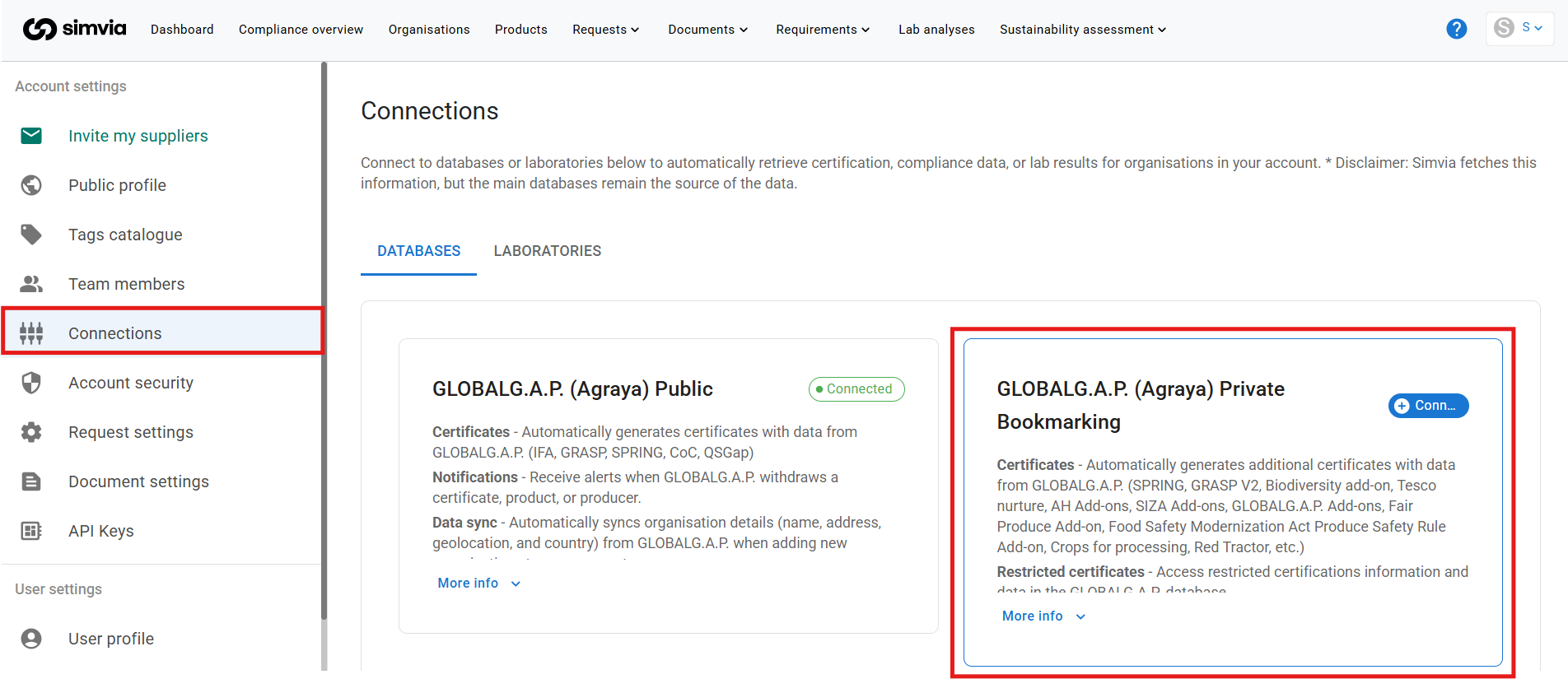
4. Where to find the identifier
Certificate data can be retrieved using one of the following identifiers:
- GGN (GLOBALG.A.P. Number)
- GLN (Global Location Number)
- CoC Number (Chain of Custody Number)
These identifiers can be found:
- On the supplier’s GLOBALG.A.P. certificate
- In the GLOBALG.A.P. database
- In the GLOBALG.A.P. Supply Chain Portal
To enable certificate retrieval:
- Open the organisation in Simvia
- Go to Unique identifiers
- Enter the GGN, GLN, or CoC number
- Save
Without a valid identifier, certificate data cannot be retrieved.
5. How data is retrieved
After:
- The relevant GLOBALG.A.P. connection is activated, and
- An organisation has a valid GGN (GLOBALG.A.P. Number) added
Simvia will automatically retrieve certificate data.
The GLOBALG.A.P. sync runs daily at 00:00, meaning updates to certificates, withdrawals, or add-ons are refreshed automatically.
No manual request is required.
6. What data is retrieved
With GLOBALG.A.P. Public:
- IFA certificates
- GRASP certificates
- SPRING certificates
- CoC certificates
- QSGap
- Organisation details (name, address, country, geolocation)
- Certificate withdrawal notifications
With Private Bookmarking (extended access):
- GRASP V2
- SPRING
- Biodiversity add-on
- Tesco Nurture
- AH add-ons
- SIZA add-ons
- GLOBALG.A.P. add-ons
- Fair Produce add-on
- Food Safety Modernization Act Produce Safety Rule add-on
- Crops for Processing
- Red Tractor
- Other restricted certificates
Private Bookmarking provides access to certificate data not available via the public connection.
7. How to access and use the data
Retrieved GLOBALG.A.P. data can be accessed in the following locations:
- On the organisation’s detail page under the Connections tab
- On the organisation’s detail page under the Documents tab
- Via Documents → Supplier documents
Please note:
The documents generated via the GLOBALG.A.P. connection are database extracts, not the original certificates issued by the certification body.
These extracts are automatically generated by Simvia to reduce manual document collection and provide up-to-date certificate status information.
If required, you can still request the original certificate directly from your supplier.
You can use this data to:
- Monitor certificate validity
- Track expiration dates
- Detect withdrawals
- Support audit preparation
- Automate compliance checks via requirement rules
- Track lists of option 2 producers listed under a producer group
8. Important to know
- The Public connection requires no credentials
- Private Bookmarking requires an official GLOBALG.A.P. API account
- Both connections can exist simultaneously
- Data is refreshed daily at 00:00
- A valid GGN must be added to each organisation
- For new organisations, remember to add the GGN/GLN/CoC to enable retrieval
- Only certificates available in GLOBALG.A.P. can be retrieved
The GLOBALG.A.P. connections significantly reduce manual certificate collection and improve data reliability within your supply chain.