
Documents – Bulk Upload
Bulk upload allows you to add multiple supplier documents at once. This is especially useful during onboarding or when uploading a large number of certificates.
How to bulk upload documents
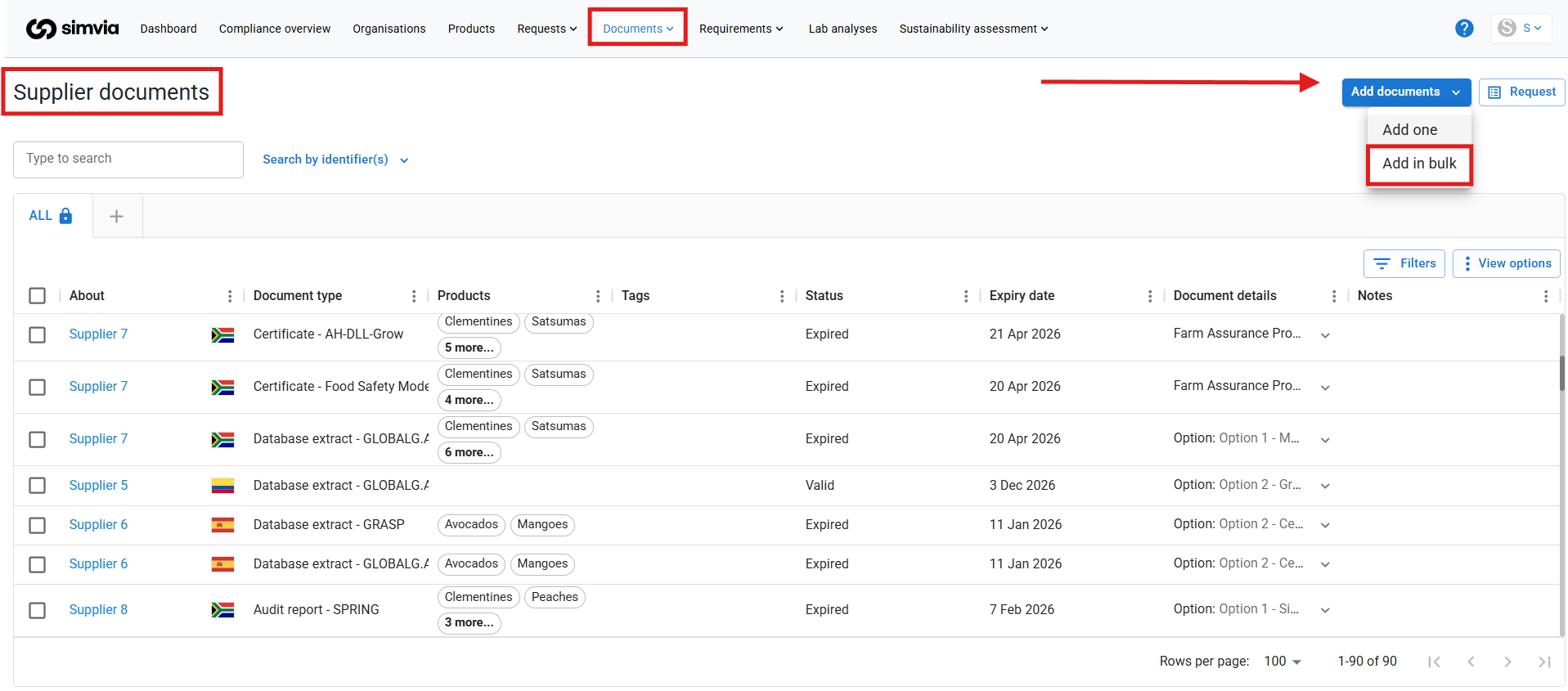
- Go to Documents → Supplier documents
- Click + Bulk upload
You will be redirected to the bulk upload page.
Uploading files
In the section “Drag and drop files here”, you can:
- Drag multiple documents into the field, or
- Select multiple files from your computer
All selected files will be uploaded together.
Automatic metadata extraction (AI)
After uploading, the system can automatically extract key document information using AI.
The following fields may be pre-filled:
- Document type
- Document provider
- About (organisation)
- Expiry date
You can always review and adjust the information manually by clicking on a document.
Editing multiple documents at once
If several documents share the same metadata (for example, the same document type), you can:
- Select multiple documents
- Assign the document type or other fields in one action
This saves time when managing large uploads.
Final step
Once all documents are reviewed and mandatory fields are completed, confirm the upload.
The documents will then appear in your Supplier Documents overview and be included in compliance tracking.
Bulk upload helps you save time while keeping your document library complete and structured.