---
title: How Setting Up a Product-Specific Rule Works
description: Set up product-specific requirement rules to request documents only for selected products and ensure suppliers receive relevant requests.
---
[Skip to content](https://helpcenter.simvia.com/knowledge-base/how-to-set-up-product-specific-rules-and-how-it-works#main-content)
English
Show submenu for translations
[](https://helpcenter.simvia.com/knowledge-base?hsLang=en)
Open main navigation
Close main navigation
- English
Show submenu for translations
This is a search field with an auto-suggest feature attached.
- There are no suggestions because the search field is empty.
1. [Help Center](https://helpcenter.simvia.com/knowledge-base?hsLang=en)
2. [Supply Chain Approval (SCA)](https://helpcenter.simvia.com/knowledge-base/supply-chain-approval-sca?hsLang=en)
3. [Requirements](https://helpcenter.simvia.com/knowledge-base/supply-chain-approval-sca?hsLang=en#requirements)
# How Setting Up a Product-Specific Rule Works
Product-specific requirement rules allow you to request documents only for certain products instead of applying the rule to all products. This ensures suppliers only receive relevant requests.
For example, you can request residue analyses only for specific products supplied by your traders.
---
#### Step 1: Create a Requirement Rule
Go to **Requirements → Requirement rules** and click **+ New requirement rule**.
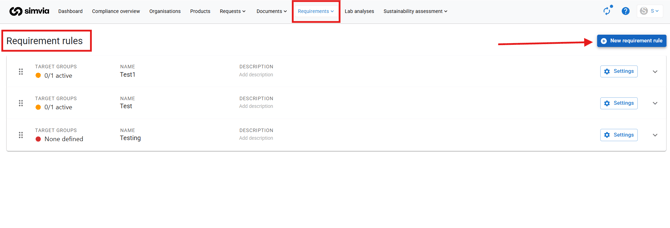
Enter a name and optionally add a description for internal use. The description is not visible to suppliers.
---
#### Step 2: Add Requirement Cards
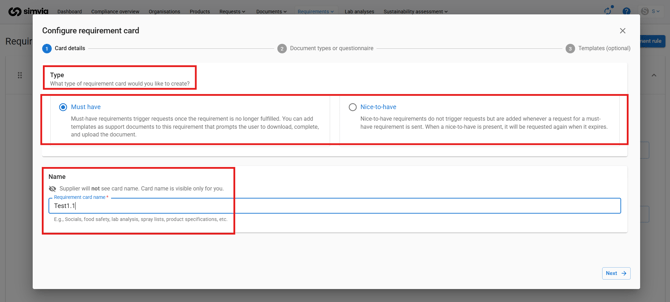
Add requirement cards to define which documents you want to request.
- **Must-have** documents are mandatory and trigger automatic requests
- **Nice-to-have** documents are optional
Important:
- If a rule only contains Nice-to-have cards, no automatic requests will be sent
You can also attach templates from **Own documents** if suppliers need to complete a specific form.
---
#### Step 3: Define Product Scope
When setting up each requirement card, define which products the rule applies to:
- All products
- Products with a specific tag
- Selected individual products
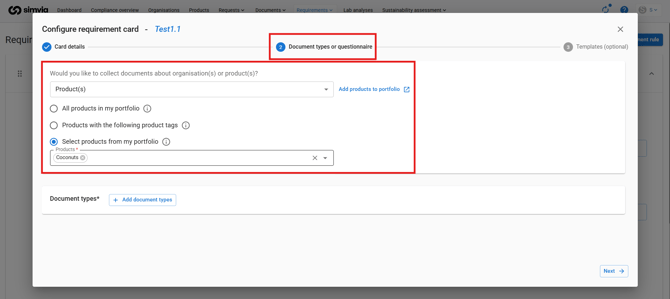
This ensures documents are only requested for relevant products.
---
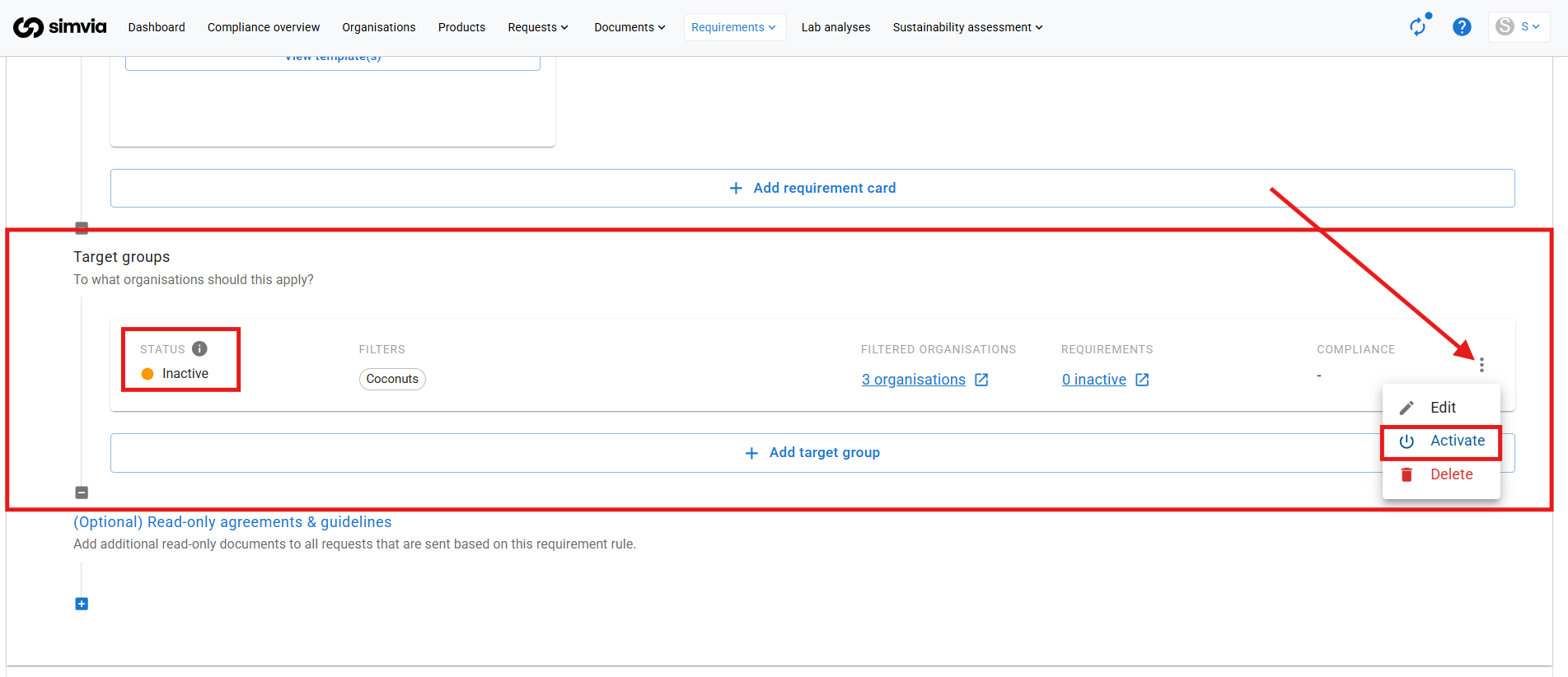
#### Step 4: Define the Target Group
Add a target group to determine which organisations the rule applies to.
You can use filters such as:
- Organisation type
- Tags
- Country
- Products
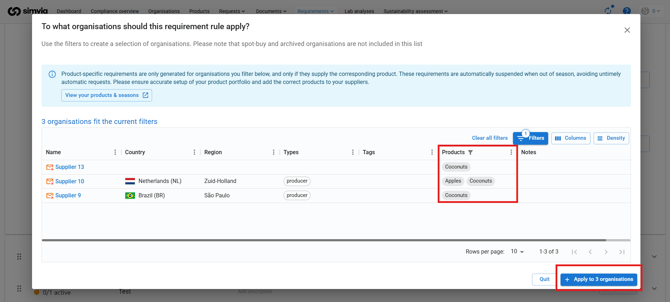
You can review:
- **Filtered organisations** to see which suppliers are included
- **Requirements** to see which documents will be requested
- **Valid requirements** to see the compliance percentage
---
#### Step 5: Activate the Rule
Activate the target group to start sending requests.
Once active, the rule automatically generates and manages product-specific document requests based on your configuration.
---
#### Target Group Status
Each target group has a status:
- **Active (Green)** – automatic document requests are sent
- **Inactive (Yellow)** – no automatic requests, used for monitoring
- **Not configured (Red)** – target group not set
If a rule has multiple target groups, you can activate some while keeping others inactive.
- [Getting Started](https://helpcenter.simvia.com/knowledge-base/getting-started?hsLang=en#main-content)
- [About Simvia](https://helpcenter.simvia.com/knowledge-base/getting-started?hsLang=en#about-simvia)
- [Navigating the Platform](https://helpcenter.simvia.com/knowledge-base/getting-started?hsLang=en#navigating-the-platform)
- [Account & Access](https://helpcenter.simvia.com/knowledge-base/getting-started?hsLang=en#account-access)
- [Supply Chain Approval (SCA)](https://helpcenter.simvia.com/knowledge-base/supply-chain-approval-sca?hsLang=en#main-content)
- [Dashboard](https://helpcenter.simvia.com/knowledge-base/supply-chain-approval-sca?hsLang=en#dashboard)
- [Compliance Overview](https://helpcenter.simvia.com/knowledge-base/supply-chain-approval-sca?hsLang=en#compliance-overview)
- [Organisations](https://helpcenter.simvia.com/knowledge-base/supply-chain-approval-sca?hsLang=en#organisations)
- [Products](https://helpcenter.simvia.com/knowledge-base/supply-chain-approval-sca?hsLang=en#products)
- [Requests](https://helpcenter.simvia.com/knowledge-base/supply-chain-approval-sca?hsLang=en#requests)
- [Documents](https://helpcenter.simvia.com/knowledge-base/supply-chain-approval-sca?hsLang=en#documents)
- [Requirements](https://helpcenter.simvia.com/knowledge-base/supply-chain-approval-sca?hsLang=en#requirements)
- [PPWR](https://helpcenter.simvia.com/knowledge-base/ppwr?hsLang=en)
- [Sustainability Risk Assessment (SRA)](https://helpcenter.simvia.com/knowledge-base/sustainability-risk-assessment-sra?hsLang=en)
- [Connections](https://helpcenter.simvia.com/knowledge-base/connections?hsLang=en#main-content)
- [Certification Databases](https://helpcenter.simvia.com/knowledge-base/connections?hsLang=en#certification-databases)
- [Laboratory Integrations](https://helpcenter.simvia.com/knowledge-base/connections?hsLang=en#laboratory-integrations)
- [Updates](https://helpcenter.simvia.com/knowledge-base/updates?hsLang=en#main-content)
- [Release Notes 2026](https://helpcenter.simvia.com/knowledge-base/updates?hsLang=en#release-notes-2026)
- [Release Notes 2025](https://helpcenter.simvia.com/knowledge-base/updates?hsLang=en#release-notes-2025)
[](https://www.simvia.com/)
Copyright © 2026, Simvia