---
title: How to Structure your Supply Chain
description: Learn how to structure your supply chain by linking organisations as suppliers and customers, ensuring document requests and requirement rules flow correctly.
---
[Skip to content](https://helpcenter.simvia.com/knowledge-base/how-to-structure-your-supply-chain#main-content)
English
Show submenu for translations
[](https://helpcenter.simvia.com/knowledge-base?hsLang=en)
Open main navigation
Close main navigation
- English
Show submenu for translations
This is a search field with an auto-suggest feature attached.
- There are no suggestions because the search field is empty.
1. [Help Center](https://helpcenter.simvia.com/knowledge-base?hsLang=en)
2. [Supply Chain Approval (SCA)](https://helpcenter.simvia.com/knowledge-base/supply-chain-approval-sca?hsLang=en)
3. [Organisations](https://helpcenter.simvia.com/knowledge-base/supply-chain-approval-sca?hsLang=en#organisations)
# How to Structure your Supply Chain
This article explains how to create supplier relationships and build your supply chain structure.
Setting up your supply chain ensures that:
- Document requests flow correctly
- Requirement rules apply to the right organisations
- You have a clear overview of how organisations are connected
You can build your supply chain either **top-down** (adding sub-suppliers) or **bottom-up** (adding customers).
---
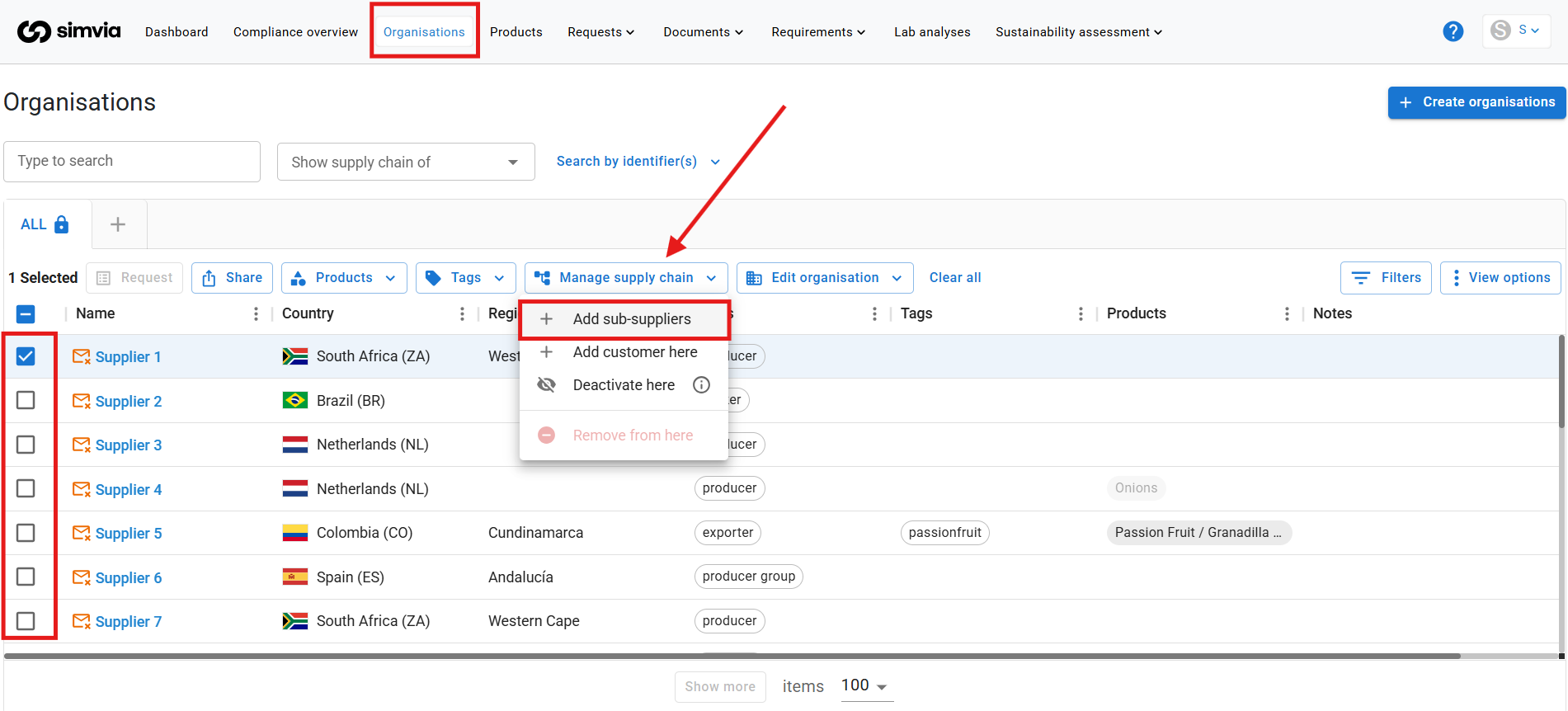
### Method 1: Add a Sub-supplier (Top-down)
Use this method when you want to add a supplier underneath another organisation.
### Steps:
1. Go to **Organisations**
2. Open the organisation that should have a sub-supplier
3. Click **Manage supply chain**
4. Select **Add sub-supplier**
5. Search for the correct organisation
6. Click **Add**
The sub-supplier will now appear underneath the selected organisation in the supply chain view.
---
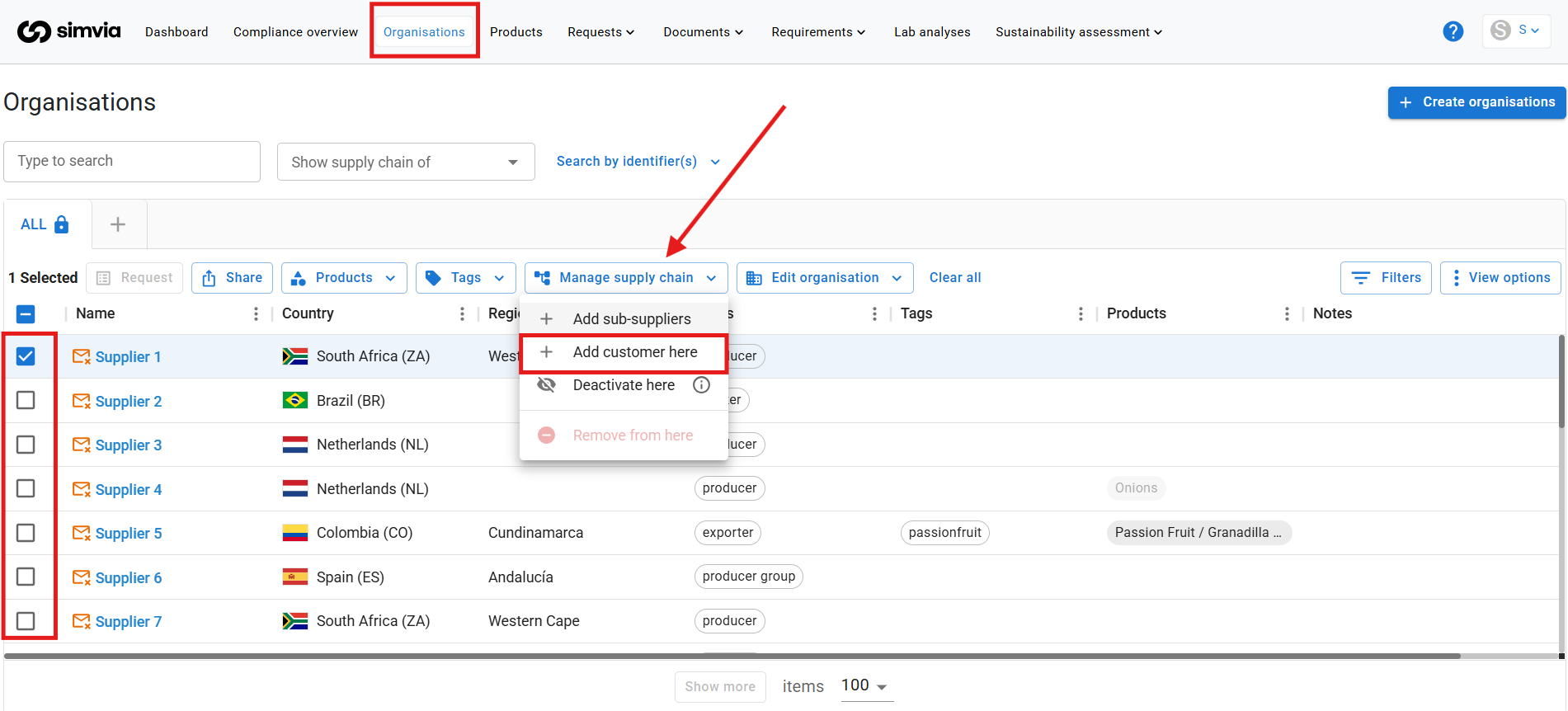
### Method 2: Add a Customer (Bottom-up)
Use this method when you want to add a customer above an organisation.
### Steps:
1. Go to **Organisations**
2. Open the organisation that should have a customer
3. Click **Manage supply chain**
4. Select **Add customer here**
5. Search for the correct organisation
6. Click **Add**
The customer will now appear above the selected organisation.
---
### Creating Multiple Levels
You can create multiple layers within your supply chain. For example:
Producer → Packhouse → Trader → Retailer
Simply repeat the steps above to add additional layers.
---
### Important
- Organisations must already exist in your account before they can be linked.
- The supply chain structure should reflect your real operational flow.
- Correct relationships ensure that requirements and document requests are generated accurately.
Once your structure is created, you can move on to managing and adjusting your supply chain as needed.
- [Getting Started](https://helpcenter.simvia.com/knowledge-base/getting-started?hsLang=en#main-content)
- [About Simvia](https://helpcenter.simvia.com/knowledge-base/getting-started?hsLang=en#about-simvia)
- [Navigating the Platform](https://helpcenter.simvia.com/knowledge-base/getting-started?hsLang=en#navigating-the-platform)
- [Account & Access](https://helpcenter.simvia.com/knowledge-base/getting-started?hsLang=en#account-access)
- [Supply Chain Approval (SCA)](https://helpcenter.simvia.com/knowledge-base/supply-chain-approval-sca?hsLang=en#main-content)
- [Dashboard](https://helpcenter.simvia.com/knowledge-base/supply-chain-approval-sca?hsLang=en#dashboard)
- [Compliance Overview](https://helpcenter.simvia.com/knowledge-base/supply-chain-approval-sca?hsLang=en#compliance-overview)
- [Organisations](https://helpcenter.simvia.com/knowledge-base/supply-chain-approval-sca?hsLang=en#organisations)
- [Products](https://helpcenter.simvia.com/knowledge-base/supply-chain-approval-sca?hsLang=en#products)
- [Requests](https://helpcenter.simvia.com/knowledge-base/supply-chain-approval-sca?hsLang=en#requests)
- [Documents](https://helpcenter.simvia.com/knowledge-base/supply-chain-approval-sca?hsLang=en#documents)
- [Requirements](https://helpcenter.simvia.com/knowledge-base/supply-chain-approval-sca?hsLang=en#requirements)
- [PPWR](https://helpcenter.simvia.com/knowledge-base/ppwr?hsLang=en)
- [Sustainability Risk Assessment (SRA)](https://helpcenter.simvia.com/knowledge-base/sustainability-risk-assessment-sra?hsLang=en)
- [Connections](https://helpcenter.simvia.com/knowledge-base/connections?hsLang=en#main-content)
- [Certification Databases](https://helpcenter.simvia.com/knowledge-base/connections?hsLang=en#certification-databases)
- [Laboratory Integrations](https://helpcenter.simvia.com/knowledge-base/connections?hsLang=en#laboratory-integrations)
- [Updates](https://helpcenter.simvia.com/knowledge-base/updates?hsLang=en#main-content)
- [Release Notes 2026](https://helpcenter.simvia.com/knowledge-base/updates?hsLang=en#release-notes-2026)
- [Release Notes 2025](https://helpcenter.simvia.com/knowledge-base/updates?hsLang=en#release-notes-2025)
[](https://www.simvia.com/)
Copyright © 2026, Simvia