---
title: Document Request Settings
description: Learn how to configure document request settings, including expiry alerts and reminder emails, to control when suppliers receive document requests.
---
[Skip to content](https://helpcenter.simvia.com/knowledge-base/managing-document-request-settings#main-content)
English
Show submenu for translations
[](https://helpcenter.simvia.com/knowledge-base?hsLang=en)
Open main navigation
Close main navigation
- English
Show submenu for translations
This is a search field with an auto-suggest feature attached.
- There are no suggestions because the search field is empty.
1. [Help Center](https://helpcenter.simvia.com/knowledge-base?hsLang=en)
2. [Getting Started](https://helpcenter.simvia.com/knowledge-base/getting-started?hsLang=en)
3. [Account & Access](https://helpcenter.simvia.com/knowledge-base/getting-started?hsLang=en#account-access)
# Document Request Settings
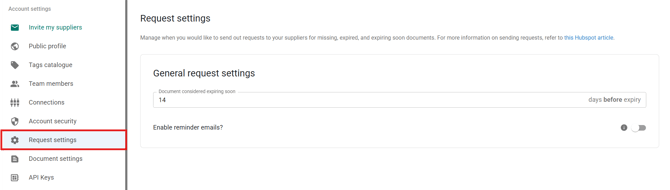
The **Request settings** tab allows you to manage when and how document requests are sent to your suppliers for missing, expired, or expiring documents.
These settings help you control communication frequency and prevent unnecessary reminders.
---
#### General request settings
### Document considered expiring soon
Here you define how many days before a document’s expiry date it is considered **expiring soon**.
---
The number of days you set here also determines how many days a supplier has to provide a renewed document once it enters the “expiring soon” status.
If the document is not updated within this defined period, the requirement will move into **“no progress.”**
For example:
- If set to **14 days**, the system will treat documents that expire within 14 days as expiring soon.
- Based on your requirement rules, this may trigger automatic document requests.
Choose a timeframe that gives suppliers enough time to upload updated certificates.
---
### Enable reminder emails
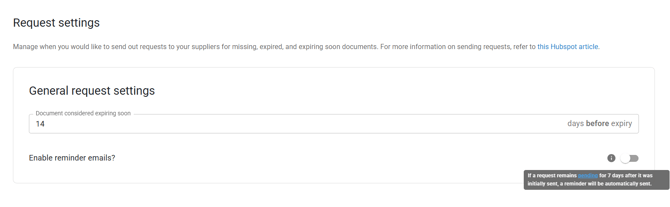
You can choose whether reminder emails should be sent for open document requests.
If enabled:
- Suppliers will receive follow-up reminders for pending requests.
- This helps increase response rates without manual follow-up.
If disabled:
- Only the initial request will be sent.
- No automatic reminder emails will follow.
---
#### **Automatic request timeline**
The timing of automatic requests depends on how the document is retrieved.
For documents that **cannot be retrieved through database connections**, an initial request is sent **7 days before expiry**, followed by a reminder **7 days later** if the supplier hasn't responded.
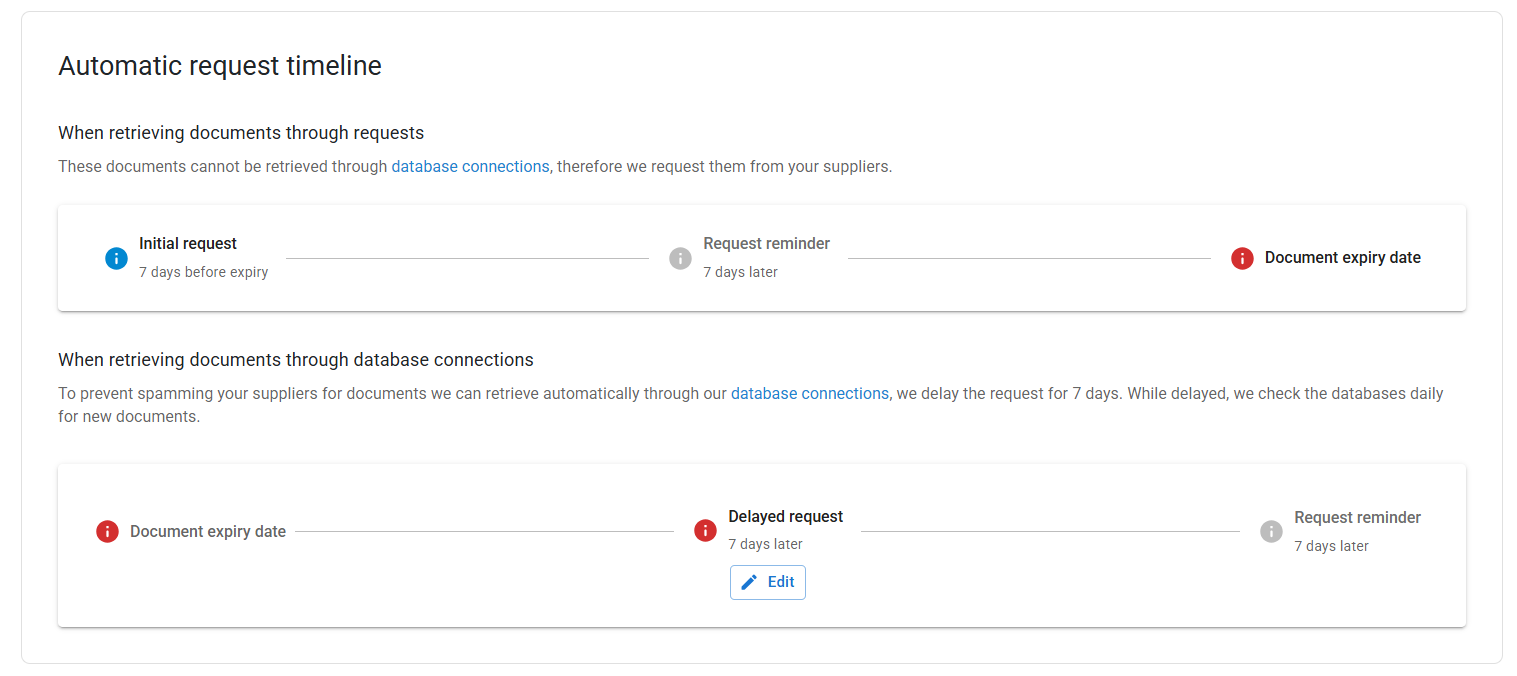
For documents that **can be retrieved through database connections**, Simvia first waits **7 days after the expiry date** before sending a request — during this time, the system checks the connected databases daily for an updated document. This prevents unnecessary requests to suppliers for documents that may already be available automatically. If nothing is found after those 7 days, a request is sent, with a follow-up reminder another **7 days later**.
---
#### Best practice
- Avoid setting the expiry window too early, as suppliers may not yet have renewed documents.
- Avoid setting it too late, as this may leave insufficient time before expiration.
- Enable reminder emails to improve response rates, especially for large supplier networks.
Properly configured request settings help balance compliance control with efficient supplier communication.
- [Getting Started](https://helpcenter.simvia.com/knowledge-base/getting-started?hsLang=en#main-content)
- [About Simvia](https://helpcenter.simvia.com/knowledge-base/getting-started?hsLang=en#about-simvia)
- [Navigating the Platform](https://helpcenter.simvia.com/knowledge-base/getting-started?hsLang=en#navigating-the-platform)
- [Account & Access](https://helpcenter.simvia.com/knowledge-base/getting-started?hsLang=en#account-access)
- [Supply Chain Approval (SCA)](https://helpcenter.simvia.com/knowledge-base/supply-chain-approval-sca?hsLang=en#main-content)
- [Dashboard](https://helpcenter.simvia.com/knowledge-base/supply-chain-approval-sca?hsLang=en#dashboard)
- [Compliance Overview](https://helpcenter.simvia.com/knowledge-base/supply-chain-approval-sca?hsLang=en#compliance-overview)
- [Organisations](https://helpcenter.simvia.com/knowledge-base/supply-chain-approval-sca?hsLang=en#organisations)
- [Products](https://helpcenter.simvia.com/knowledge-base/supply-chain-approval-sca?hsLang=en#products)
- [Requests](https://helpcenter.simvia.com/knowledge-base/supply-chain-approval-sca?hsLang=en#requests)
- [Documents](https://helpcenter.simvia.com/knowledge-base/supply-chain-approval-sca?hsLang=en#documents)
- [Requirements](https://helpcenter.simvia.com/knowledge-base/supply-chain-approval-sca?hsLang=en#requirements)
- [PPWR](https://helpcenter.simvia.com/knowledge-base/ppwr?hsLang=en)
- [Sustainability Risk Assessment (SRA)](https://helpcenter.simvia.com/knowledge-base/sustainability-risk-assessment-sra?hsLang=en)
- [Connections](https://helpcenter.simvia.com/knowledge-base/connections?hsLang=en#main-content)
- [Certification Databases](https://helpcenter.simvia.com/knowledge-base/connections?hsLang=en#certification-databases)
- [Laboratory Integrations](https://helpcenter.simvia.com/knowledge-base/connections?hsLang=en#laboratory-integrations)
- [Updates](https://helpcenter.simvia.com/knowledge-base/updates?hsLang=en#main-content)
- [Release Notes 2026](https://helpcenter.simvia.com/knowledge-base/updates?hsLang=en#release-notes-2026)
- [Release Notes 2025](https://helpcenter.simvia.com/knowledge-base/updates?hsLang=en#release-notes-2025)
[](https://www.simvia.com/)
Copyright © 2026, Simvia