---
title: Managing Notifications and Email Reminders
description: Learn how to manage notification preferences and email reminders, including alerts for expiring requirements, pending requests, and certification database updates.
---
[Skip to content](https://helpcenter.simvia.com/knowledge-base/managing-notifications-and-email-reminders#main-content)
English
Show submenu for translations
[](https://helpcenter.simvia.com/knowledge-base?hsLang=en)
Open main navigation
Close main navigation
- English
Show submenu for translations
This is a search field with an auto-suggest feature attached.
- There are no suggestions because the search field is empty.
1. [Help Center](https://helpcenter.simvia.com/knowledge-base?hsLang=en)
2. [Getting Started](https://helpcenter.simvia.com/knowledge-base/getting-started?hsLang=en)
3. [Account & Access](https://helpcenter.simvia.com/knowledge-base/getting-started?hsLang=en#account-access)
# Managing Notifications and Email Reminders
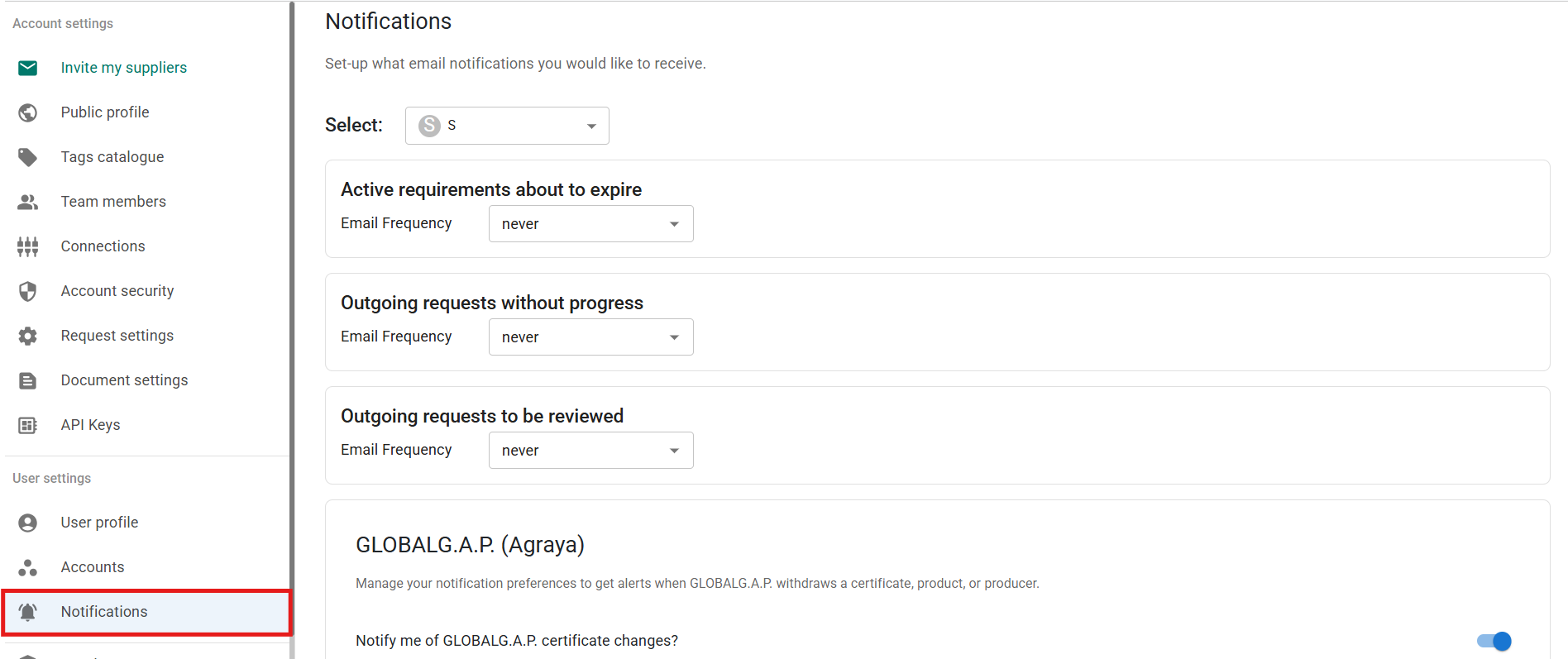
The **Notifications** page allows you to control which email updates you receive and how frequently you receive them. Settings are configured per account and per user, giving you full control over your inbox.
---
#### Selecting the account
At the top of the page, use the dropdown menu to select the account (company) for which you want to manage notifications.
If you are part of multiple company accounts, you can configure notifications separately for each one.
---
### 1. Email reminders for requests and requirements
These notifications help you stay on top of document collection and compliance activities.
You can set the **email frequency** (for example: never, daily, etc.) for:
### Active requirements about to expire
Receive alerts when requirement deadlines are approaching.
### Outgoing requests without progress
Get notified when suppliers have not responded to a request.
### Outgoing requests to be reviewed
Receive a notification when a supplier uploads documents that require your review.
These reminders ensure that expiring documents and pending reviews do not go unnoticed.
---
### 2. Database notifications (e.g. GLOBALG.A.P.)
If your account is connected to external databases, you can manage certificate-related alerts here.
For example, under **GLOBALG.A.P. (Agraya)** you can:
- Enable or disable certificate change notifications
- Select which specific standards you want to receive updates for (e.g. IFA, GRASP, CoC, SPRING, etc.)
You will then receive alerts if a certificate is withdrawn, updated, or changed in the database.
---
### How email reminders work
- Notifications are sent to your registered email address.
- Each user manages their own notification preferences.
- Settings apply only to the selected account.
- If email frequency is set to **“Never”**, you will not receive reminders for that category.
These settings allow you to stay informed about compliance risks and supplier activity while avoiding unnecessary emails.
---
By properly configuring your notifications, you can:
- React quickly to expiring documents
- Review supplier uploads on time
- Monitor database certificate changes
- Keep control over your email volume
Each user can adjust these settings at any time.
- [Getting Started](https://helpcenter.simvia.com/knowledge-base/getting-started?hsLang=en#main-content)
- [About Simvia](https://helpcenter.simvia.com/knowledge-base/getting-started?hsLang=en#about-simvia)
- [Navigating the Platform](https://helpcenter.simvia.com/knowledge-base/getting-started?hsLang=en#navigating-the-platform)
- [Account & Access](https://helpcenter.simvia.com/knowledge-base/getting-started?hsLang=en#account-access)
- [Supply Chain Approval (SCA)](https://helpcenter.simvia.com/knowledge-base/supply-chain-approval-sca?hsLang=en#main-content)
- [Dashboard](https://helpcenter.simvia.com/knowledge-base/supply-chain-approval-sca?hsLang=en#dashboard)
- [Compliance Overview](https://helpcenter.simvia.com/knowledge-base/supply-chain-approval-sca?hsLang=en#compliance-overview)
- [Organisations](https://helpcenter.simvia.com/knowledge-base/supply-chain-approval-sca?hsLang=en#organisations)
- [Products](https://helpcenter.simvia.com/knowledge-base/supply-chain-approval-sca?hsLang=en#products)
- [Requests](https://helpcenter.simvia.com/knowledge-base/supply-chain-approval-sca?hsLang=en#requests)
- [Documents](https://helpcenter.simvia.com/knowledge-base/supply-chain-approval-sca?hsLang=en#documents)
- [Requirements](https://helpcenter.simvia.com/knowledge-base/supply-chain-approval-sca?hsLang=en#requirements)
- [PPWR](https://helpcenter.simvia.com/knowledge-base/ppwr?hsLang=en)
- [Sustainability Risk Assessment (SRA)](https://helpcenter.simvia.com/knowledge-base/sustainability-risk-assessment-sra?hsLang=en)
- [Connections](https://helpcenter.simvia.com/knowledge-base/connections?hsLang=en#main-content)
- [Certification Databases](https://helpcenter.simvia.com/knowledge-base/connections?hsLang=en#certification-databases)
- [Laboratory Integrations](https://helpcenter.simvia.com/knowledge-base/connections?hsLang=en#laboratory-integrations)
- [Updates](https://helpcenter.simvia.com/knowledge-base/updates?hsLang=en#main-content)
- [Release Notes 2026](https://helpcenter.simvia.com/knowledge-base/updates?hsLang=en#release-notes-2026)
- [Release Notes 2025](https://helpcenter.simvia.com/knowledge-base/updates?hsLang=en#release-notes-2025)
[](https://www.simvia.com/)
Copyright © 2026, Simvia