
1. What is Normec Groen Agro Control?
Normec Groen Agro Control is a laboratory that provides analytical testing services, including:
- Residue analyses
- Microbiological testing
- Other laboratory analyses
Simvia offers a laboratory connection with Normec Groen Agro Control to integrate lab data directly into your supply chain workflows.
This connection is currently in beta.
2. What can you do with Normec Groen Agro Control?
By connecting Normec Groen Agro Control to Simvia, you can:
- Access laboratory results in one central place
- Reduce manual handling of lab reports
- Support sampling and risk analysis
- Improve product allocation decisions
This helps centralise quality and safety data within your compliance processes.
3. How to set up a connection
Setting up the connection consists of two required parts.
Step 1 – Create the connection in Simvia
- Go to Account settings
- Open Connections
- Navigate to Laboratories
- Create a new connection
- Select Normec Groen Agro Control
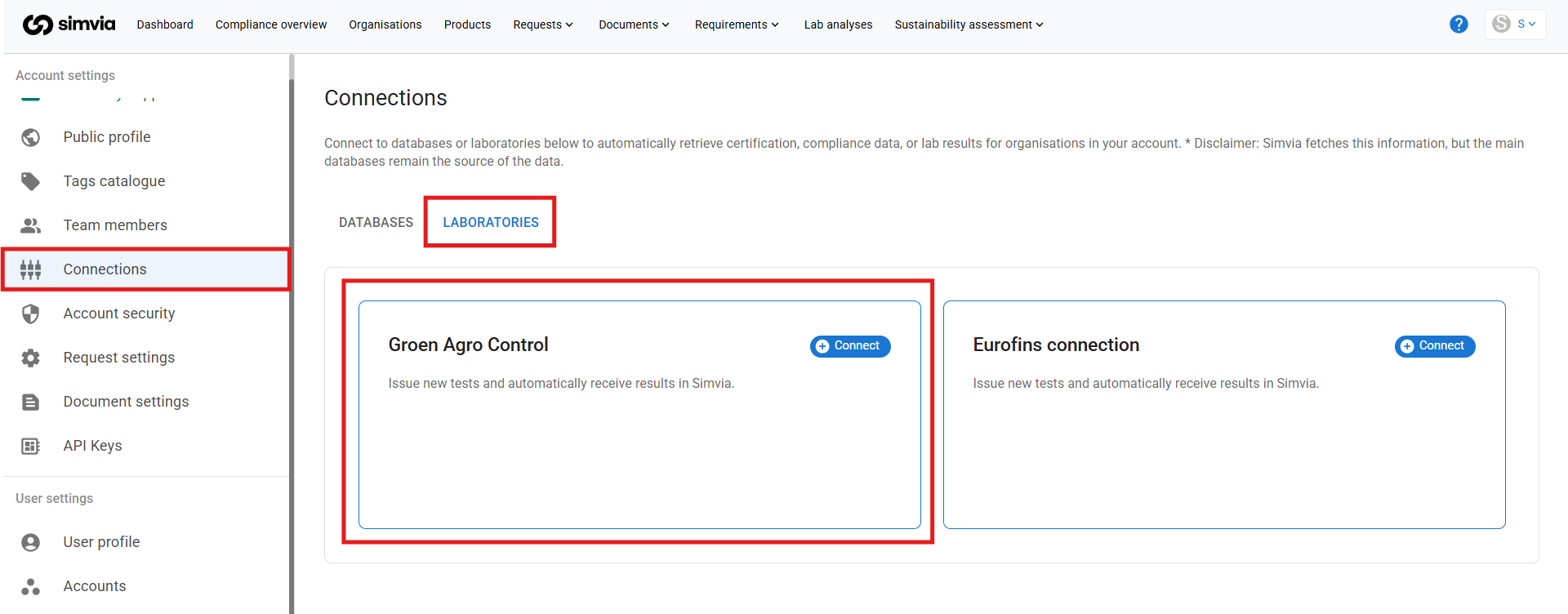
Step 2 – Authorise data sharing
Before the connection can be completed, Normec Groen Agro Control must be authorised to share your analysis results with Simvia.
To grant permission:
- Send a request to info@agrocontrol.nl, confirming that your laboratory results may be shared with Simvia
This authorisation is required before login credentials can be issued.
Step 3 – Enter your credentials
Once permission is granted, you will receive unique login credentials from Normec Groen Agro Control.
- Enter these credentials in Simvia
- Confirm the connection
After activation, laboratory results will become available automatically.
4. Where to find the identifier
No organisation-level identifier needs to be added in Simvia.
Access is based on:
- Your authorised Normec Groen Agro Control account
- The credentials provided after permission is granted
If needed, Normec can confirm how your laboratory account is structured.
5. How to retrieve data for an organisation
Once the connection is active and authorisation is completed:
- Laboratory results linked to your Normec account are retrieved automatically
- No manual upload is required
- Results are retrieved every hour
Results are made available in Simvia for review and management.
6. What data is retrieved
When available, Simvia retrieves:
- Laboratory analysis reports
- Test results (e.g. residue levels, microbiological findings)
- Sampling and analysis details
Available data depends on the analyses performed and shared by Normec.
7. How to access and use the data
Retrieved laboratory results can be accessed within Simvia, where you can:
- Review analysis results
- Use them in quality and compliance checks
- Include them in risk assessments
- Support product approval and allocation decisions
All results remain stored within your account.
8. Important to know
- Normec must authorise data sharing before results can be retrieved
- Valid credentials are required
- Data availability depends on the analyses performed
- Functionality may expand over time
If results are missing or incomplete, verify that permission has been granted and credentials are correctly entered.
For assistance, contact your Simvia representative or the Support team.