---
title: Overview of Account Settings
description: Learn what you can manage in Account Settings, including supplier invitations, public profile details, team members, security settings, and document request configuration.
---
[Skip to content](https://helpcenter.simvia.com/knowledge-base/overview-of-account-settings#main-content)
English
Show submenu for translations
[](https://helpcenter.simvia.com/knowledge-base?hsLang=en)
Open main navigation
Close main navigation
- English
Show submenu for translations
This is a search field with an auto-suggest feature attached.
- There are no suggestions because the search field is empty.
1. [Help Center](https://helpcenter.simvia.com/knowledge-base?hsLang=en)
2. [Getting Started](https://helpcenter.simvia.com/knowledge-base/getting-started?hsLang=en)
3. [Account & Access](https://helpcenter.simvia.com/knowledge-base/getting-started?hsLang=en#account-access)
# Overview of Account Settings
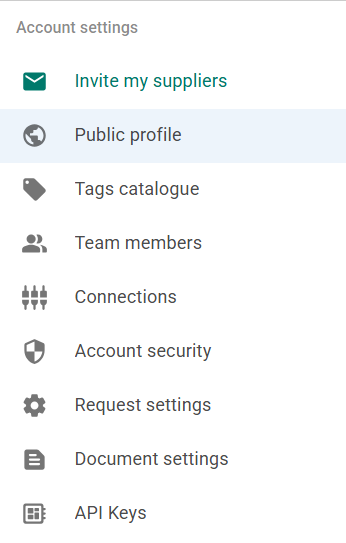
The **Account settings** section allows you to manage company-level settings for your organisation. These settings apply to your entire account and control how your organisation manages users, suppliers, documents, and platform access.
You can access **Account settings** from your profile menu in the top-right corner of the platform.
Below is a brief overview of the available tabs.
---
#### Invite my suppliers
Invite suppliers to join the platform and connect with your organisation so you can request documents and collaborate within your supply chain.
See [**Inviting suppliers**](https://helpcenter.simvia.com/knowledge-base/inviting-suppliers?hsLang=en) for detailed instructions.
---
#### Public profile
Manage the public information of your organisation, including company details, identifiers, and shared documents.
See [**Setting up your public profile**](https://helpcenter.simvia.com/knowledge-base/setting-up-your-public-profile-in-simvia?hsLang=en).
---
#### Tags catalogue
View and manage tags used to organise suppliers in your account.
See [**Managing tags**](https://helpcenter.simvia.com/knowledge-base/managing-tags?hsLang=en).
---
#### Team members
Add or remove users in your organisation and manage their roles and permissions.
See [**Managing team members and permissions**](https://helpcenter.simvia.com/knowledge-base/managing-team-members-and-permissions?hsLang=en).
---
#### Account security
Manage login and security settings for your organisation.
See [**Managing account security**](https://helpcenter.simvia.com/knowledge-base/managing-account-security?hsLang=en).
---
#### Request settings
Configure how document requests and reminders are automatically generated.
See [**Document request settings**](https://helpcenter.simvia.com/knowledge-base/managing-document-request-settings?hsLang=en).
---
#### Document settings
Manage document handling preferences such as automatic archiving of expired documents.
See [**Document archiving settings**](https://helpcenter.simvia.com/knowledge-base/document-archiving-settings?hsLang=en).
---
#### API keys
Generate and manage API keys for integrating your account with external systems.
See [**Connecting your ERP system using the API**](https://helpcenter.simvia.com/knowledge-base/connecting-your-erp-system-using-the-simvia-api?hsLang=en).
- [Getting Started](https://helpcenter.simvia.com/knowledge-base/getting-started?hsLang=en#main-content)
- [About Simvia](https://helpcenter.simvia.com/knowledge-base/getting-started?hsLang=en#about-simvia)
- [Navigating the Platform](https://helpcenter.simvia.com/knowledge-base/getting-started?hsLang=en#navigating-the-platform)
- [Account & Access](https://helpcenter.simvia.com/knowledge-base/getting-started?hsLang=en#account-access)
- [Supply Chain Approval (SCA)](https://helpcenter.simvia.com/knowledge-base/supply-chain-approval-sca?hsLang=en#main-content)
- [Dashboard](https://helpcenter.simvia.com/knowledge-base/supply-chain-approval-sca?hsLang=en#dashboard)
- [Compliance Overview](https://helpcenter.simvia.com/knowledge-base/supply-chain-approval-sca?hsLang=en#compliance-overview)
- [Organisations](https://helpcenter.simvia.com/knowledge-base/supply-chain-approval-sca?hsLang=en#organisations)
- [Products](https://helpcenter.simvia.com/knowledge-base/supply-chain-approval-sca?hsLang=en#products)
- [Requests](https://helpcenter.simvia.com/knowledge-base/supply-chain-approval-sca?hsLang=en#requests)
- [Documents](https://helpcenter.simvia.com/knowledge-base/supply-chain-approval-sca?hsLang=en#documents)
- [Requirements](https://helpcenter.simvia.com/knowledge-base/supply-chain-approval-sca?hsLang=en#requirements)
- [PPWR](https://helpcenter.simvia.com/knowledge-base/ppwr?hsLang=en)
- [Sustainability Risk Assessment (SRA)](https://helpcenter.simvia.com/knowledge-base/sustainability-risk-assessment-sra?hsLang=en)
- [Connections](https://helpcenter.simvia.com/knowledge-base/connections?hsLang=en#main-content)
- [Certification Databases](https://helpcenter.simvia.com/knowledge-base/connections?hsLang=en#certification-databases)
- [Laboratory Integrations](https://helpcenter.simvia.com/knowledge-base/connections?hsLang=en#laboratory-integrations)
- [Updates](https://helpcenter.simvia.com/knowledge-base/updates?hsLang=en#main-content)
- [Release Notes 2026](https://helpcenter.simvia.com/knowledge-base/updates?hsLang=en#release-notes-2026)
- [Release Notes 2025](https://helpcenter.simvia.com/knowledge-base/updates?hsLang=en#release-notes-2025)
[](https://www.simvia.com/)
Copyright © 2026, Simvia