
What to fill in by 12 August 2026
Your customer uses Simvia to show their packaging meets Regulation (EU) 2025/40 (PPWR), which applies from 12 August 2026. This guide walks you through:
-
Filling the questionnaire,
-
Uploading evidence,
-
What to fill in per section, and
-
A quick recap at the end.
It is general information, not legal advice.
Filling in the questionnaire
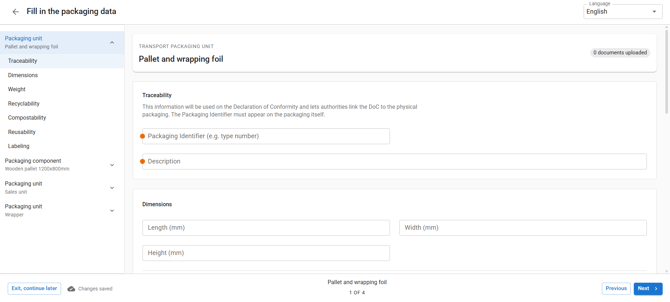
- Open the questionnaire. You fill this in online for the product your customer asks about. This may be a whole packaging unit, its individual parts, or both.
- Answer the questions indicated with an orange dot first. Some questions, such as material type, food contact, and reusable, decide what appears next. Answer them and the right fields follow.
If you'd like a broader walkthrough of the request itself, from opening it to signing and sending, see How to Respond to a PPWR Packaging Data Request.
Uploading evidence
Some fields need a supporting document. When a blue banner appears, click Add and upload the file it asks for. If a field has no banner, no document is needed.
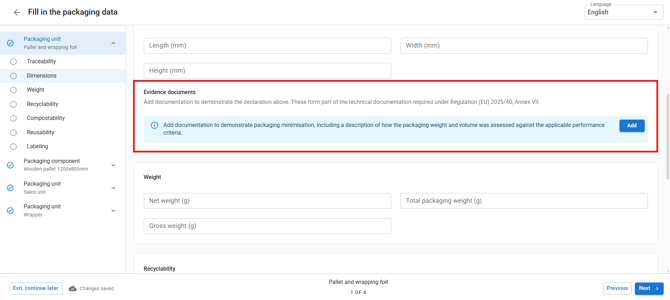
You can add more than one document to the same field, for example a lab report alongside a signed declaration.
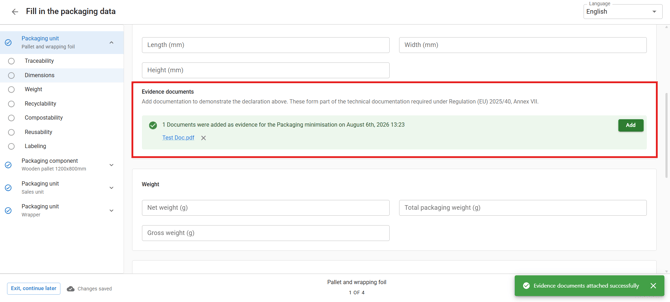
Once a document is attached, the field turns green and shows the file name and upload date, confirming it was successfully uploaded.
What to fill in
The left sidebar is handy for moving through the questionnaire sections in order, it lists Identify the product, Substances, and Reusable packaging as you go.
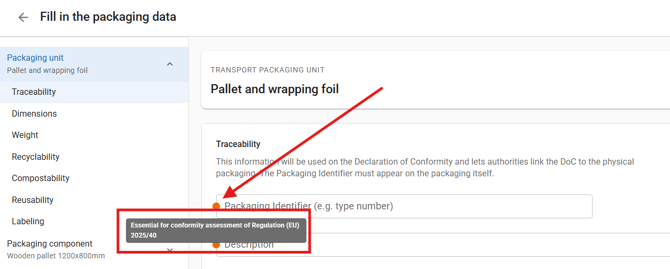
Fields marked with an orange dot are mandatory.
Section 1 · Identify the product
| Question | What to enter |
|---|---|
| Packaging type | e.g. crate, pallet, film, tray |
| Material type | e.g. plastic, glass, wood, paper/board, metal |
| Food-contact packaging | Yes / No (selecting Yes will trigger the PFAS question) |
| Reusable? | Yes / No (selecting Yes will trigger the reuse questions) |
Section 2 · Substances (Article 5), for every product
- Substances of concern: describe briefly how you keep other substances of concern to a minimum. Upload via the blue banner.
- Heavy metals: answer Yes / No (sum of Pb, Cd, Hg, Cr(VI) ≤ 100 mg/kg, stating the actual sum is optional). Blue banner: upload a lab report, or a risk analysis with a signed declaration."
- PFAS: only for products in contact with food. Answer Yes / No (below the PFAS limits, 25 ppb per substance, 250 ppb combined). Blue banner: upload a lab report, or a supplier declaration and risk analysis.
Section 3 · Reusable packaging (Article 11), only if Reusable = Yes
Skip this if the packaging is single-use. If it is reusable, confirm it meets the requirements and upload the documents the banners ask for:
| Requirement | Document to upload |
|---|---|
| Designed for reuse (multiple uses, empties without damage, safe to handle, can be labelled) | Packaging specification / technical data sheet, durability test |
| Material safety | Food-contact compliance document, migration test, safety data sheet, cosmetics compliance declaration, or REACH SVHC declaration |
| Hygiene (if refilled / contact-sensitive) | Hygiene protocol |
| Reconditioning | Reconditioning process document |
| Reusability assessment | A short description of how you checked the packaging meets the reuse criteria |
Recap
- Answer the initial questions first, then fill in what appears. The questionnaire adapts as you go, some questions only show up once an earlier answer makes them relevant. For example, answering Yes to "food-contact packaging " reveals the PFAS question, and answering Yes to "Reusable?" reveals Section 3. If a question doesn't apply to your product, it simply won't appear, so you won't need to skip past it manually.
- Blue banner means a document is needed. Click Add to upload, you can add more than one file per field, and click any file name to preview it.
-
Fields marked with an orange dot are mandatory.
- Every product needs substances of concern and heavy metals. Food-contact products also need PFAS. Reusable packaging also needs the Article 11 documents.
Need help? Contact your Simvia contact if anything is unclear before you submit.