---
title: Sharing Documents Through your Public Profile
description: Learn how to share documents through your Public Profile, allowing connected organisations to access certificates automatically and reducing the need for manual document requests.
---
[Skip to content](https://helpcenter.simvia.com/knowledge-base/sharing-documents-through-your-public-profile-in-simvia#main-content)
English
Show submenu for translations
[](https://helpcenter.simvia.com/knowledge-base?hsLang=en)
Open main navigation
Close main navigation
- English
Show submenu for translations
This is a search field with an auto-suggest feature attached.
- There are no suggestions because the search field is empty.
1. [Help Center](https://helpcenter.simvia.com/knowledge-base?hsLang=en)
2. [Getting Started](https://helpcenter.simvia.com/knowledge-base/getting-started?hsLang=en)
3. [Account & Access](https://helpcenter.simvia.com/knowledge-base/getting-started?hsLang=en#account-access)
# Sharing Documents Through your Public Profile
### Public Documents
Public documents allow you to share key certificates and files with connected organisations automatically. This reduces repetitive document requests and keeps information easily accessible within the platform.
When you publish documents on your **Public profile**, linked organisations can view and retrieve them without sending a request.
---
### Why use Public Documents?
#### Benefits for suppliers
- Fewer incoming document requests
- Documents are shared automatically once published
- Less manual document handling
#### Benefits for buyers
- Immediate access to available supplier documents
- No need to request documents that are already published
- Faster document review process
---
#### How to add Public Documents
To upload or share documents publicly:
1. Go to **Account settings → Public profile → Public documents**
2. Choose one of the following options:
- **Upload document** to add a new file
- **Add from own documents** to reuse a document already stored in your account
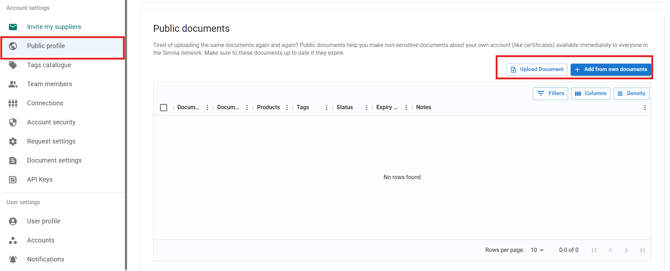
Once uploaded, the document becomes visible to organisations that are connected to you.
---
#### How to view Public Documents from suppliers
You can access public documents shared by your suppliers in two ways:
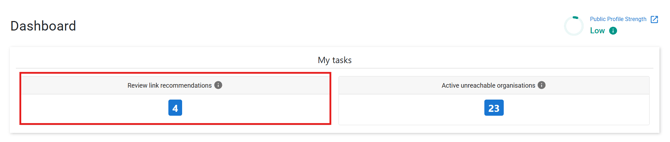
- Via **Dashboard → My tasks → Review public documents**
****
- Via the organisation page under **Documents → Public documents**
Public documents can be reviewed and stored in your account if needed.
---
#### Keeping documents up to date
Maintaining updated public documents helps avoid repeated requests and ensures accurate information.
- Replace documents when they expire
- Upload new versions when changes occur
- Remove outdated or incorrect files
---
#### Best practice
- Keep your public documents up to date
- Only publish documents that can be shared within your network
- Use public documents to reduce manual requests and improve efficiency
Sharing documents through your Public profile helps streamline collaboration, reduce manual work, and keep your supply chain information organised.
- [Getting Started](https://helpcenter.simvia.com/knowledge-base/getting-started?hsLang=en#main-content)
- [About Simvia](https://helpcenter.simvia.com/knowledge-base/getting-started?hsLang=en#about-simvia)
- [Navigating the Platform](https://helpcenter.simvia.com/knowledge-base/getting-started?hsLang=en#navigating-the-platform)
- [Account & Access](https://helpcenter.simvia.com/knowledge-base/getting-started?hsLang=en#account-access)
- [Supply Chain Approval (SCA)](https://helpcenter.simvia.com/knowledge-base/supply-chain-approval-sca?hsLang=en#main-content)
- [Dashboard](https://helpcenter.simvia.com/knowledge-base/supply-chain-approval-sca?hsLang=en#dashboard)
- [Compliance Overview](https://helpcenter.simvia.com/knowledge-base/supply-chain-approval-sca?hsLang=en#compliance-overview)
- [Organisations](https://helpcenter.simvia.com/knowledge-base/supply-chain-approval-sca?hsLang=en#organisations)
- [Products](https://helpcenter.simvia.com/knowledge-base/supply-chain-approval-sca?hsLang=en#products)
- [Requests](https://helpcenter.simvia.com/knowledge-base/supply-chain-approval-sca?hsLang=en#requests)
- [Documents](https://helpcenter.simvia.com/knowledge-base/supply-chain-approval-sca?hsLang=en#documents)
- [Requirements](https://helpcenter.simvia.com/knowledge-base/supply-chain-approval-sca?hsLang=en#requirements)
- [PPWR](https://helpcenter.simvia.com/knowledge-base/ppwr?hsLang=en)
- [Sustainability Risk Assessment (SRA)](https://helpcenter.simvia.com/knowledge-base/sustainability-risk-assessment-sra?hsLang=en)
- [Connections](https://helpcenter.simvia.com/knowledge-base/connections?hsLang=en#main-content)
- [Certification Databases](https://helpcenter.simvia.com/knowledge-base/connections?hsLang=en#certification-databases)
- [Laboratory Integrations](https://helpcenter.simvia.com/knowledge-base/connections?hsLang=en#laboratory-integrations)
- [Updates](https://helpcenter.simvia.com/knowledge-base/updates?hsLang=en#main-content)
- [Release Notes 2026](https://helpcenter.simvia.com/knowledge-base/updates?hsLang=en#release-notes-2026)
- [Release Notes 2025](https://helpcenter.simvia.com/knowledge-base/updates?hsLang=en#release-notes-2025)
[](https://www.simvia.com/)
Copyright © 2026, Simvia