---
title: Understanding Documents
description: Learn how to upload, manage, and share documents across your supply chain using the Documents section.
---
[Skip to content](https://helpcenter.simvia.com/knowledge-base/understanding-documents#main-content)
English
Show submenu for translations
[](https://helpcenter.simvia.com/knowledge-base?hsLang=en)
Open main navigation
Close main navigation
- English
Show submenu for translations
This is a search field with an auto-suggest feature attached.
- There are no suggestions because the search field is empty.
1. [Help Center](https://helpcenter.simvia.com/knowledge-base?hsLang=en)
2. [Supply Chain Approval (SCA)](https://helpcenter.simvia.com/knowledge-base/supply-chain-approval-sca?hsLang=en)
3. [Documents](https://helpcenter.simvia.com/knowledge-base/supply-chain-approval-sca?hsLang=en#documents)
# Understanding Documents
The **Documents** section allows you to upload, manage, and share documents related to your organisation and suppliers.
It provides a structured way to store documentation and keep track of supplier documents across your supply chain.
#### Uploading documents
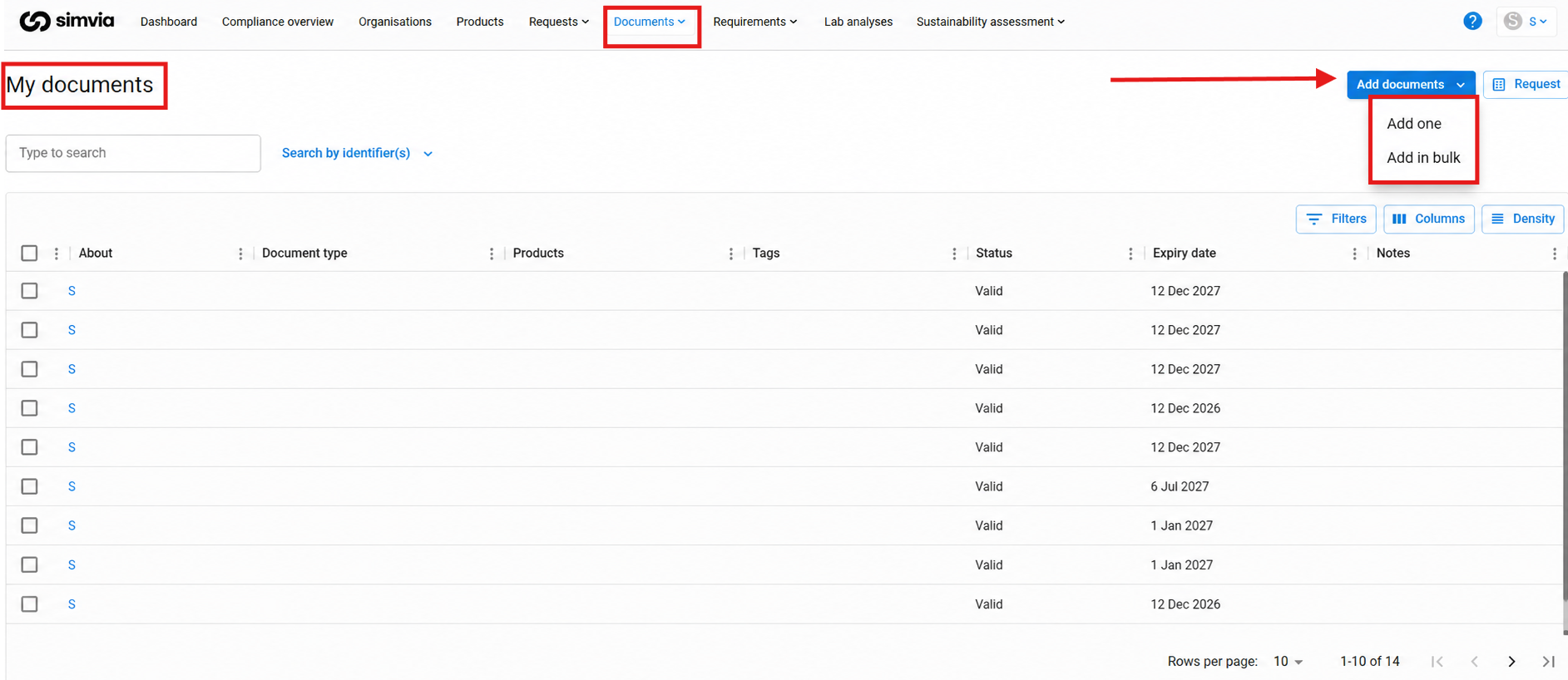
You can upload documents on both the **Own documents** and **Supplier documents** pages.
Supported upload methods include:
- Uploading documents individually
- Uploading multiple documents using **bulk upload**
Bulk upload is useful when adding larger document sets at once.
#### Sharing documents via email
Documents stored under **Own documents** can be shared directly via email.
To share a document:
1. Select one or more documents
2. Choose **Share via email**
3. Enter the recipient details
4. Confirm the action
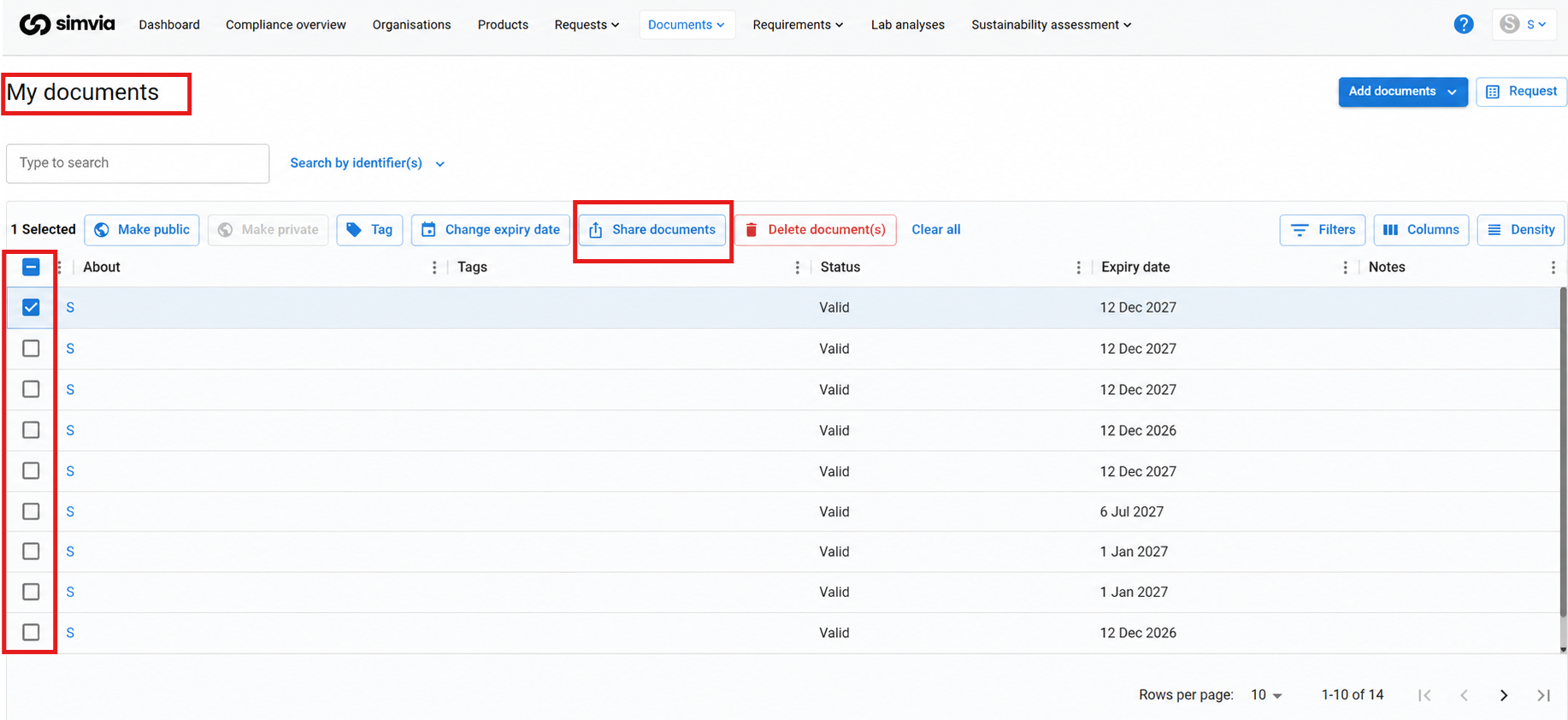
Shared documents are automatically recorded in the **Shared documents** page so you can track what has been sent.
#### Manual document requests
From the **Supplier documents** page, you can create **manual document requests**.
This allows you to request documents from suppliers outside of automated workflows.
Manual requests are useful for:
- One-time document requests
- Exceptional document updates
- Documents not covered by requirement rules
#### Best practices for document management
To keep your document library organised:
- Store documents about your organisation in **Own documents**
- Keep supplier-related documents in **Supplier documents**
- Use **bulk upload** when adding many files
- Share documents through the platform to maintain a clear record
Maintaining a structured document library helps ensure documents remain accessible and up to date.
- [Getting Started](https://helpcenter.simvia.com/knowledge-base/getting-started?hsLang=en#main-content)
- [About Simvia](https://helpcenter.simvia.com/knowledge-base/getting-started?hsLang=en#about-simvia)
- [Navigating the Platform](https://helpcenter.simvia.com/knowledge-base/getting-started?hsLang=en#navigating-the-platform)
- [Account & Access](https://helpcenter.simvia.com/knowledge-base/getting-started?hsLang=en#account-access)
- [Supply Chain Approval (SCA)](https://helpcenter.simvia.com/knowledge-base/supply-chain-approval-sca?hsLang=en#main-content)
- [Dashboard](https://helpcenter.simvia.com/knowledge-base/supply-chain-approval-sca?hsLang=en#dashboard)
- [Compliance Overview](https://helpcenter.simvia.com/knowledge-base/supply-chain-approval-sca?hsLang=en#compliance-overview)
- [Organisations](https://helpcenter.simvia.com/knowledge-base/supply-chain-approval-sca?hsLang=en#organisations)
- [Products](https://helpcenter.simvia.com/knowledge-base/supply-chain-approval-sca?hsLang=en#products)
- [Requests](https://helpcenter.simvia.com/knowledge-base/supply-chain-approval-sca?hsLang=en#requests)
- [Documents](https://helpcenter.simvia.com/knowledge-base/supply-chain-approval-sca?hsLang=en#documents)
- [Requirements](https://helpcenter.simvia.com/knowledge-base/supply-chain-approval-sca?hsLang=en#requirements)
- [PPWR](https://helpcenter.simvia.com/knowledge-base/ppwr?hsLang=en)
- [Sustainability Risk Assessment (SRA)](https://helpcenter.simvia.com/knowledge-base/sustainability-risk-assessment-sra?hsLang=en)
- [Connections](https://helpcenter.simvia.com/knowledge-base/connections?hsLang=en#main-content)
- [Certification Databases](https://helpcenter.simvia.com/knowledge-base/connections?hsLang=en#certification-databases)
- [Laboratory Integrations](https://helpcenter.simvia.com/knowledge-base/connections?hsLang=en#laboratory-integrations)
- [Updates](https://helpcenter.simvia.com/knowledge-base/updates?hsLang=en#main-content)
- [Release Notes 2026](https://helpcenter.simvia.com/knowledge-base/updates?hsLang=en#release-notes-2026)
- [Release Notes 2025](https://helpcenter.simvia.com/knowledge-base/updates?hsLang=en#release-notes-2025)
[](https://www.simvia.com/)
Copyright © 2026, Simvia