---
title: Understanding Organisations
description: Learn how to manage organisations in your supply chain, including searching, filtering, and accessing organisation details and related documents.
---
[Skip to content](https://helpcenter.simvia.com/knowledge-base/understanding-organisations#main-content)
English
Show submenu for translations
[](https://helpcenter.simvia.com/knowledge-base?hsLang=en)
Open main navigation
Close main navigation
- English
Show submenu for translations
This is a search field with an auto-suggest feature attached.
- There are no suggestions because the search field is empty.
1. [Help Center](https://helpcenter.simvia.com/knowledge-base?hsLang=en)
2. [Supply Chain Approval (SCA)](https://helpcenter.simvia.com/knowledge-base/supply-chain-approval-sca?hsLang=en)
3. [Organisations](https://helpcenter.simvia.com/knowledge-base/supply-chain-approval-sca?hsLang=en#organisations)
# Understanding Organisations
The **Organisations** page is where you manage supplier information and access related supply chain and compliance data.
From this page, you can search organisations, review their details, and access documents, requirements, and supply chain relationships.
#### Searching and filtering organisations
The Organisations page includes several tools to help you quickly find the information you need.
You can:
- **Search** by organisation name or identifier
- Use **Search by Identifier(s)** to search multiple identifiers at once
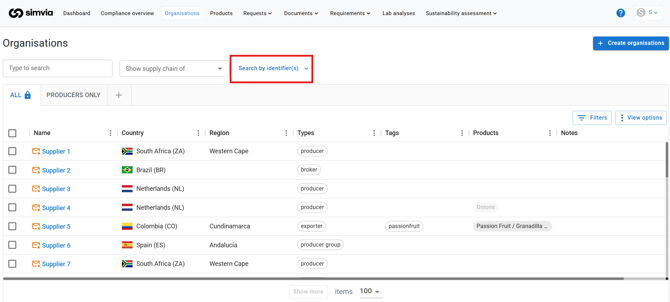
- Apply filters to narrow down the list
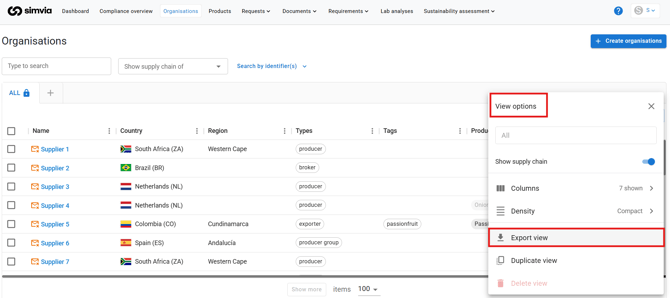
- Create **Custom views** for frequently used filters
Custom views are saved per user and allow you to switch quickly between different organisation lists.
You can also export the organisation overview to **Excel**. If filters are applied, only the filtered results will be exported.
#### Organisation details page
Clicking on an organisation opens its **organisation details page**, where you can access additional information and related data.
### Organisation info
This section displays general information about the organisation, including:
- Name
- Organisation type
- Address
- Contact information
- Identifiers
Adding identifiers linked to certification databases can enable automatic retrieval of organisation data and certificates.
### Connections
The **Connections** section shows active database connections, such as:
- GLOBALG.A.P.
- BRCGS
- QS
- PlanetProof
- FSSC 22000
- BioC
### Documents
This tab displays all documents associated with the organisation.
If sub-suppliers exist, their documents are also included in this view.
### Supply chain
The **Supply Chain** tab shows connected suppliers and sub-suppliers within the network.
### Requirements
This section displays which standards or requirement rules apply to the organisation.
### Products
The **Products** tab lists products supplied by the organisation and their seasons.
### Sustainability Risk Analysis
If enabled, this section displays the organisation’s sustainability risk score.
- [Getting Started](https://helpcenter.simvia.com/knowledge-base/getting-started?hsLang=en#main-content)
- [About Simvia](https://helpcenter.simvia.com/knowledge-base/getting-started?hsLang=en#about-simvia)
- [Navigating the Platform](https://helpcenter.simvia.com/knowledge-base/getting-started?hsLang=en#navigating-the-platform)
- [Account & Access](https://helpcenter.simvia.com/knowledge-base/getting-started?hsLang=en#account-access)
- [Supply Chain Approval (SCA)](https://helpcenter.simvia.com/knowledge-base/supply-chain-approval-sca?hsLang=en#main-content)
- [Dashboard](https://helpcenter.simvia.com/knowledge-base/supply-chain-approval-sca?hsLang=en#dashboard)
- [Compliance Overview](https://helpcenter.simvia.com/knowledge-base/supply-chain-approval-sca?hsLang=en#compliance-overview)
- [Organisations](https://helpcenter.simvia.com/knowledge-base/supply-chain-approval-sca?hsLang=en#organisations)
- [Products](https://helpcenter.simvia.com/knowledge-base/supply-chain-approval-sca?hsLang=en#products)
- [Requests](https://helpcenter.simvia.com/knowledge-base/supply-chain-approval-sca?hsLang=en#requests)
- [Documents](https://helpcenter.simvia.com/knowledge-base/supply-chain-approval-sca?hsLang=en#documents)
- [Requirements](https://helpcenter.simvia.com/knowledge-base/supply-chain-approval-sca?hsLang=en#requirements)
- [PPWR](https://helpcenter.simvia.com/knowledge-base/ppwr?hsLang=en)
- [Sustainability Risk Assessment (SRA)](https://helpcenter.simvia.com/knowledge-base/sustainability-risk-assessment-sra?hsLang=en)
- [Connections](https://helpcenter.simvia.com/knowledge-base/connections?hsLang=en#main-content)
- [Certification Databases](https://helpcenter.simvia.com/knowledge-base/connections?hsLang=en#certification-databases)
- [Laboratory Integrations](https://helpcenter.simvia.com/knowledge-base/connections?hsLang=en#laboratory-integrations)
- [Updates](https://helpcenter.simvia.com/knowledge-base/updates?hsLang=en#main-content)
- [Release Notes 2026](https://helpcenter.simvia.com/knowledge-base/updates?hsLang=en#release-notes-2026)
- [Release Notes 2025](https://helpcenter.simvia.com/knowledge-base/updates?hsLang=en#release-notes-2025)
[](https://www.simvia.com/)
Copyright © 2026, Simvia