---
title: Understanding the Dashboard
description: Learn how the Dashboard helps you monitor tasks, document requests, and compliance insights so you can quickly identify actions that require attention.
---
[Skip to content](https://helpcenter.simvia.com/knowledge-base/understanding-the-dashboard#main-content)
English
Show submenu for translations
[](https://helpcenter.simvia.com/knowledge-base?hsLang=en)
Open main navigation
Close main navigation
- English
Show submenu for translations
This is a search field with an auto-suggest feature attached.
- There are no suggestions because the search field is empty.
1. [Help Center](https://helpcenter.simvia.com/knowledge-base?hsLang=en)
2. [Supply Chain Approval (SCA)](https://helpcenter.simvia.com/knowledge-base/supply-chain-approval-sca?hsLang=en)
3. [Dashboard](https://helpcenter.simvia.com/knowledge-base/supply-chain-approval-sca?hsLang=en#dashboard)
# Understanding the Dashboard
The **Dashboard** is your control center for monitoring requests, supplier compliance, and tasks that require action.
By reviewing the dashboard regularly, you can quickly identify issues that require attention and keep your supply chain up to date.
#### My tasks
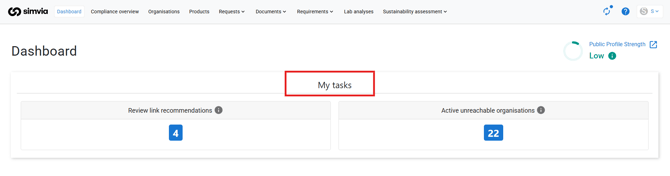
The **My tasks** section shows actions that require immediate attention.
### Organisation linking
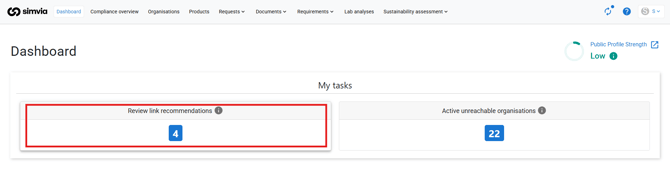
This task prompts you to review link recommendations and connect organisations in your network.
Linking organisations enables:
- Automatic syncing of organisation details
- Access to suppliers’ public documents
For detailed instructions, see the article [**Linking organisations**](https://helpcenter.simvia.com/knowledge-base/how-to-link-organisations-in-simvia?hsLang=en).
### Outgoing requests – to be reviewed
This item shows how many supplier responses are waiting for your review.
When you open these requests, you can:
- Review uploaded documents
- Accept or reject documents
- Complete the request
For more information, see the article [**Understanding Requests**](https://helpcenter.simvia.com/knowledge-base/understanding-requests?hsLang=en).
### Incoming requests – to be completed
This section shows document requests sent to you by buyers or partners.
To complete these requests:
1. Open the request
2. Upload the required documents
3. Submit the request
---
### Summaries
The **Summaries** section provides a status overview of requests and compliance.
#### All requirements
This summary shows document compliance based on your active requirement rules.
Statuses may include:
- **Partially compliant**
- **Not compliant**
- **Expiring soon**
For more detailed compliance monitoring, see [**Understanding the Compliance Overview**](https://helpcenter.simvia.com/knowledge-base/understanding-the-compliance-overview?hsLang=en).

#### Outgoing requests
This summary highlights outgoing requests that require attention, such as:
- **Ready to review**
- **Overdue**
- **Unresolved messages**
####  Incoming requests
This section displays the status of requests sent to you.
Common statuses include:
- **Sent**
- **Overdue**
- **Unresolved messages**

---
### Insights
#### Compliance status – required documents
This graph visualises document compliance based on your requirement rules.
Each bar represents a requirement rule and shows the document status across your supply chain.
If inactive requirement rules are not visible, adjust the filters to include them.

---
#### Best practice
To keep your dashboard clear and useful:
- Review **To be reviewed** requests promptly
- Address **Overdue** requests regularly
- Complete incoming requests before the due date
- Check compliance summaries weekly
Regularly reviewing the dashboard helps prevent delays and keeps your supply chain information up to date.
- [Getting Started](https://helpcenter.simvia.com/knowledge-base/getting-started?hsLang=en#main-content)
- [About Simvia](https://helpcenter.simvia.com/knowledge-base/getting-started?hsLang=en#about-simvia)
- [Navigating the Platform](https://helpcenter.simvia.com/knowledge-base/getting-started?hsLang=en#navigating-the-platform)
- [Account & Access](https://helpcenter.simvia.com/knowledge-base/getting-started?hsLang=en#account-access)
- [Supply Chain Approval (SCA)](https://helpcenter.simvia.com/knowledge-base/supply-chain-approval-sca?hsLang=en#main-content)
- [Dashboard](https://helpcenter.simvia.com/knowledge-base/supply-chain-approval-sca?hsLang=en#dashboard)
- [Compliance Overview](https://helpcenter.simvia.com/knowledge-base/supply-chain-approval-sca?hsLang=en#compliance-overview)
- [Organisations](https://helpcenter.simvia.com/knowledge-base/supply-chain-approval-sca?hsLang=en#organisations)
- [Products](https://helpcenter.simvia.com/knowledge-base/supply-chain-approval-sca?hsLang=en#products)
- [Requests](https://helpcenter.simvia.com/knowledge-base/supply-chain-approval-sca?hsLang=en#requests)
- [Documents](https://helpcenter.simvia.com/knowledge-base/supply-chain-approval-sca?hsLang=en#documents)
- [Requirements](https://helpcenter.simvia.com/knowledge-base/supply-chain-approval-sca?hsLang=en#requirements)
- [PPWR](https://helpcenter.simvia.com/knowledge-base/ppwr?hsLang=en)
- [Sustainability Risk Assessment (SRA)](https://helpcenter.simvia.com/knowledge-base/sustainability-risk-assessment-sra?hsLang=en)
- [Connections](https://helpcenter.simvia.com/knowledge-base/connections?hsLang=en#main-content)
- [Certification Databases](https://helpcenter.simvia.com/knowledge-base/connections?hsLang=en#certification-databases)
- [Laboratory Integrations](https://helpcenter.simvia.com/knowledge-base/connections?hsLang=en#laboratory-integrations)
- [Updates](https://helpcenter.simvia.com/knowledge-base/updates?hsLang=en#main-content)
- [Release Notes 2026](https://helpcenter.simvia.com/knowledge-base/updates?hsLang=en#release-notes-2026)
- [Release Notes 2025](https://helpcenter.simvia.com/knowledge-base/updates?hsLang=en#release-notes-2025)
[](https://www.simvia.com/)
Copyright © 2026, Simvia