---
title: Understanding Water Risk
description: Learn how water risk is calculated and used in the Sustainability Assessment using WWF Water Risk Filter datasets such as WRF2024, SIFAV reporting, and WRF2021.
---
[Skip to content](https://helpcenter.simvia.com/knowledge-base/understanding-water-risk-in-the-sustainability-assessment#main-content)
English
Show submenu for translations
[](https://helpcenter.simvia.com/knowledge-base?hsLang=en)
Open main navigation
Close main navigation
- English
Show submenu for translations
This is a search field with an auto-suggest feature attached.
- There are no suggestions because the search field is empty.
1. [Help Center](https://helpcenter.simvia.com/knowledge-base?hsLang=en)
2. [Sustainability Risk Assessment (SRA)](https://helpcenter.simvia.com/knowledge-base/sustainability-risk-assessment-sra?hsLang=en)
# Understanding Water Risk
Simvia supports both the **WWF Water Risk Filter 2024 (WRF2024)** and the earlier **WRF2021** dataset. This allows you to work with the most up-to-date risk insights while maintaining reporting consistency if you rely on historical data.
You can find **Water risk region** filters in the **Organisations overview → Filters**.
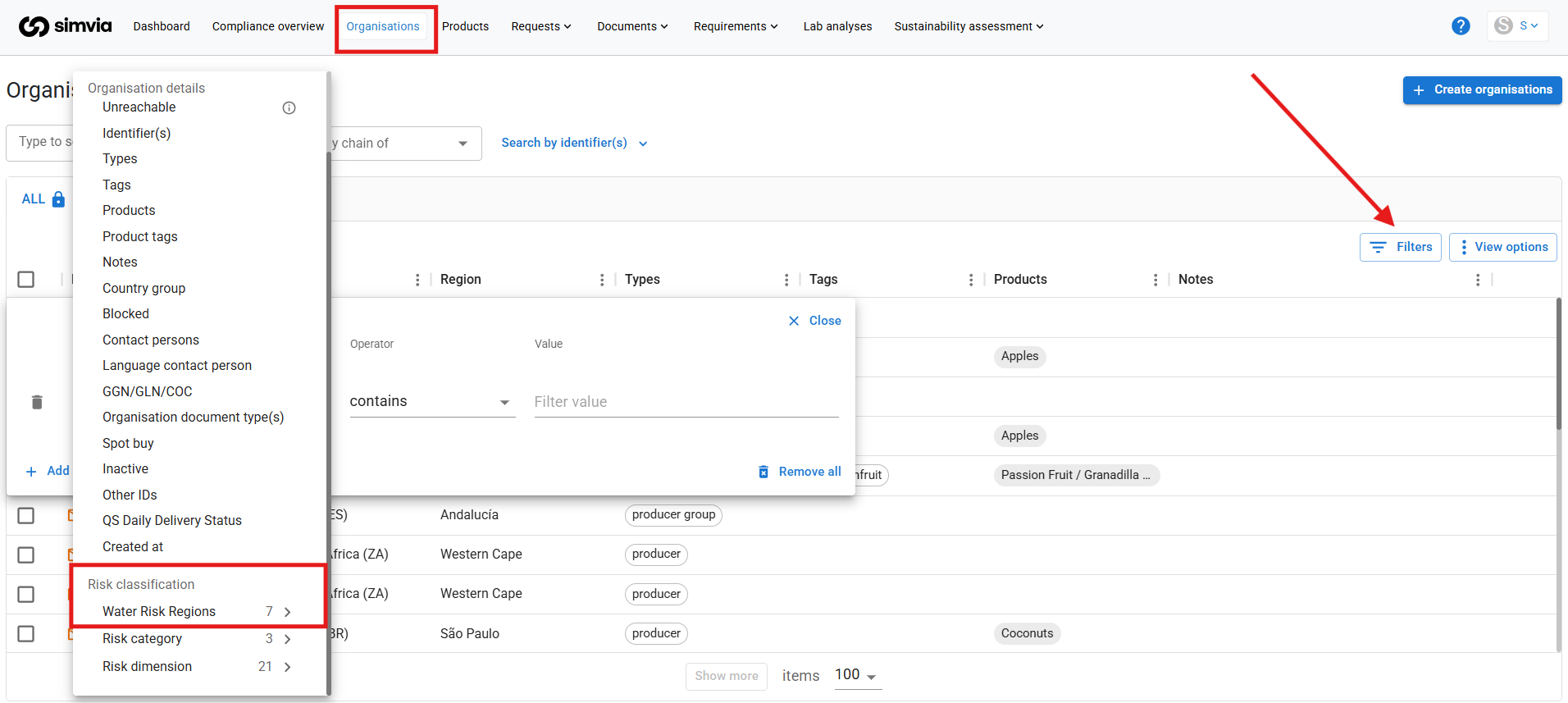
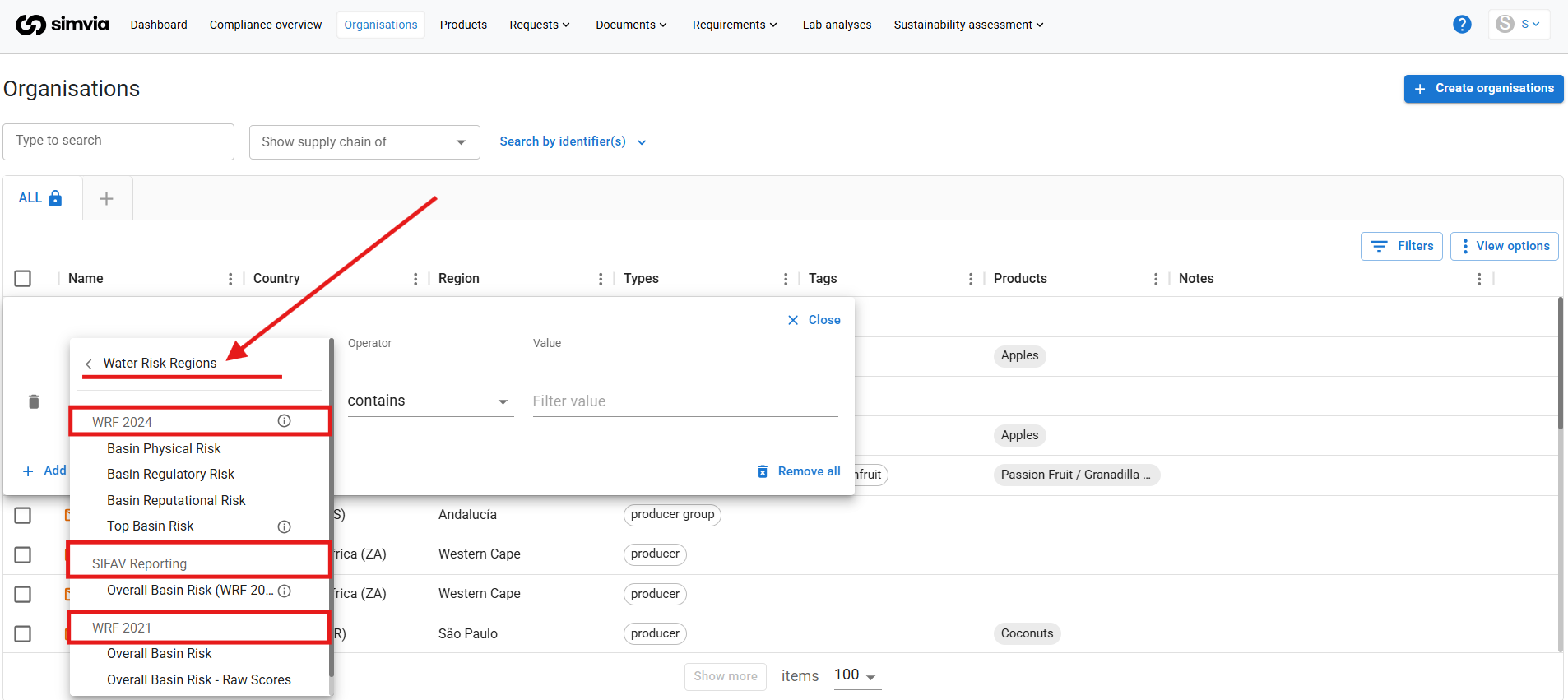
There you can choose between:
- **WRF 2024**
- **SIFAV Reporting**
- **WRF 2021**
---
#### 1. WRF 2024
WRF2024 includes updated global data and more detailed regional insights.
Unlike WRF2021 (which used one overall basin risk score), WRF2024 separates risk into three pillars:
- Basin Physical Risk
- Basin Regulatory Risk
- Basin Reputational Risk
You can also select **Top Basin Risk**, which shows the highest value across the three pillars for each organisation.
**Important:**
For water risk filters to work correctly, each organisation must have a **country and region** filled in. If regional data is unavailable, the country-level score is used instead.
---
#### 2. SIFAV Reporting
If you are part of **SIFAV** or need one combined water risk score, you can use the SIFAV Basin Risk.
This is a weighted combination of WRF2024 pillars:
**Formula:**
Overall basin risk =
(Physical × 70%) + (Regulatory × 20%) + (Reputational × 10%)
Each pillar is calculated using WWF’s agriculture weightings across sub-dimensions such as:
- Water availability
- Drought
- Flooding
- Water quality
- Governance
- Environmental and socioeconomic factors
This option is commonly used for SIFAV-aligned reporting.
---
#### 3. WRF 2021
WRF2021 remains available to support long-term reporting consistency.
The previous raw value filter has been removed to keep filtering aligned with WWF’s recommended risk categories.
---
#### Risk Categories
All water risk filters use the same WWF risk levels:
- Very Low
- Low
- Medium
- High
- Very High
These categories correspond directly to WWF’s official scoring framework.
---
#### How to Use Water Risk Filters
### 1. Identify High-Risk Suppliers
Go to **Organisations → Filters → Water Risk Region** and select:
- Dataset (e.g. WRF2024 Physical Risk)
- Risk level (e.g. High / Very High)
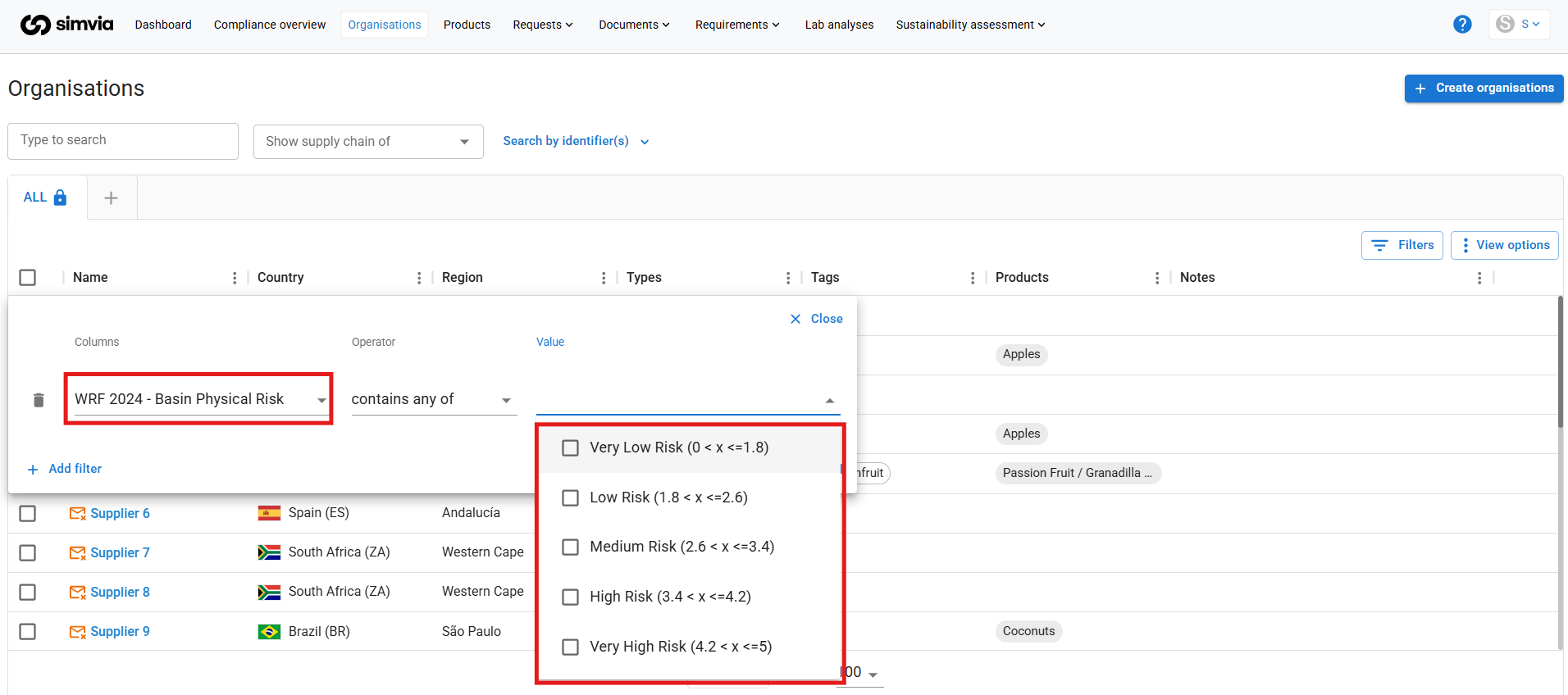
This provides an overview of suppliers located in higher-risk regions.
---
### 2. Automatically Request Documents from High-Risk Regions
You can also use water risk as a condition in Requirement Rules:
1. Go to **Requirement Rules**
2. Create or edit a rule
3. Add a filter:
**Water Risk Region → WRF2024 (e.g. Physical Risk)**
**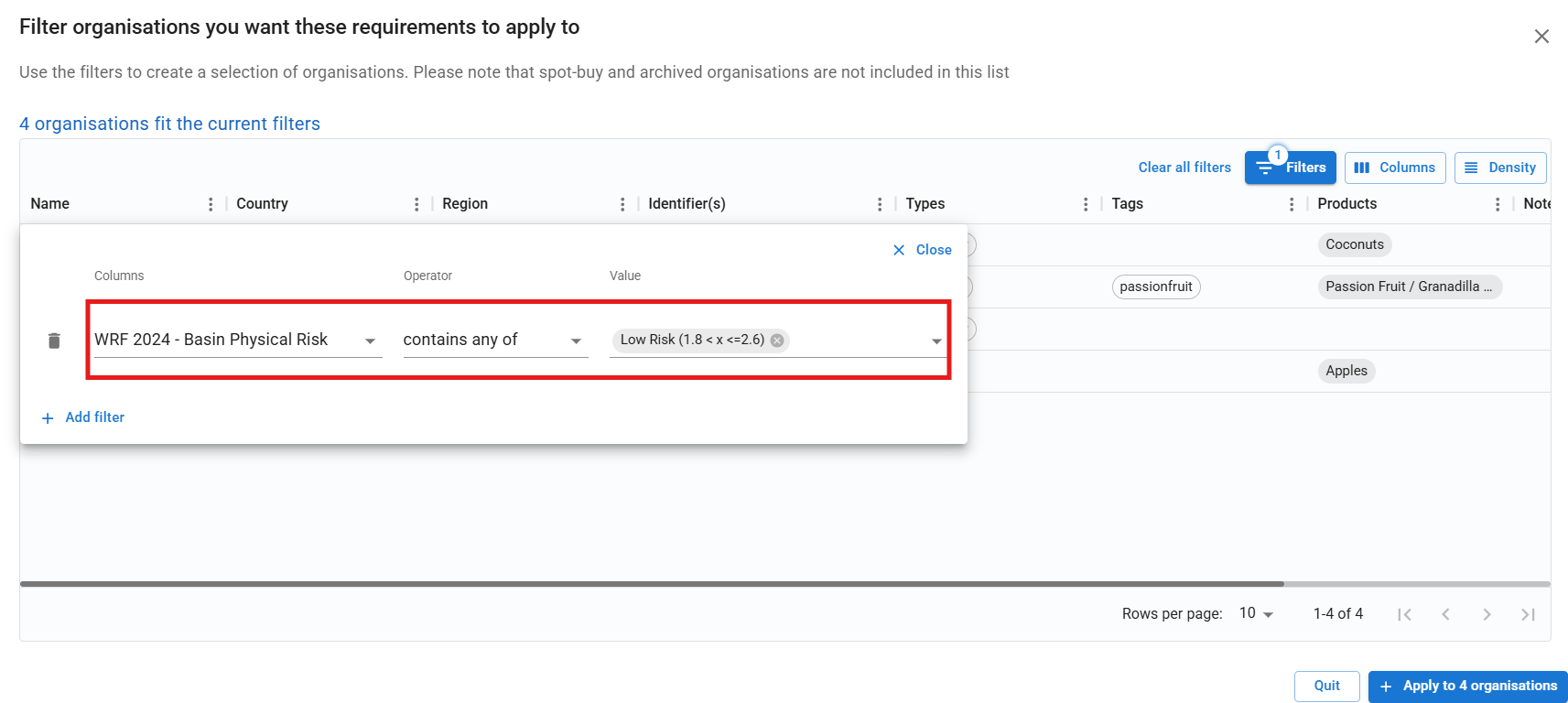**
4. Select risk levels (e.g. High / Very High)
5. Attach the required document types (e.g. SPRING, Rainforest Alliance)
6. Activate the target group
Suppliers in high-risk regions will appear as non-compliant until the required documents are provided and will be visible in your compliance overview.
---
By using water risk filters together with requirement rules, you can move from identifying risk to actively managing and mitigating it within your supply chain.
- [Getting Started](https://helpcenter.simvia.com/knowledge-base/getting-started?hsLang=en#main-content)
- [About Simvia](https://helpcenter.simvia.com/knowledge-base/getting-started?hsLang=en#about-simvia)
- [Navigating the Platform](https://helpcenter.simvia.com/knowledge-base/getting-started?hsLang=en#navigating-the-platform)
- [Account & Access](https://helpcenter.simvia.com/knowledge-base/getting-started?hsLang=en#account-access)
- [Supply Chain Approval (SCA)](https://helpcenter.simvia.com/knowledge-base/supply-chain-approval-sca?hsLang=en#main-content)
- [Dashboard](https://helpcenter.simvia.com/knowledge-base/supply-chain-approval-sca?hsLang=en#dashboard)
- [Compliance Overview](https://helpcenter.simvia.com/knowledge-base/supply-chain-approval-sca?hsLang=en#compliance-overview)
- [Organisations](https://helpcenter.simvia.com/knowledge-base/supply-chain-approval-sca?hsLang=en#organisations)
- [Products](https://helpcenter.simvia.com/knowledge-base/supply-chain-approval-sca?hsLang=en#products)
- [Requests](https://helpcenter.simvia.com/knowledge-base/supply-chain-approval-sca?hsLang=en#requests)
- [Documents](https://helpcenter.simvia.com/knowledge-base/supply-chain-approval-sca?hsLang=en#documents)
- [Requirements](https://helpcenter.simvia.com/knowledge-base/supply-chain-approval-sca?hsLang=en#requirements)
- [PPWR](https://helpcenter.simvia.com/knowledge-base/ppwr?hsLang=en)
- [Sustainability Risk Assessment (SRA)](https://helpcenter.simvia.com/knowledge-base/sustainability-risk-assessment-sra?hsLang=en)
- [Connections](https://helpcenter.simvia.com/knowledge-base/connections?hsLang=en#main-content)
- [Certification Databases](https://helpcenter.simvia.com/knowledge-base/connections?hsLang=en#certification-databases)
- [Laboratory Integrations](https://helpcenter.simvia.com/knowledge-base/connections?hsLang=en#laboratory-integrations)
- [Updates](https://helpcenter.simvia.com/knowledge-base/updates?hsLang=en#main-content)
- [Release Notes 2026](https://helpcenter.simvia.com/knowledge-base/updates?hsLang=en#release-notes-2026)
- [Release Notes 2025](https://helpcenter.simvia.com/knowledge-base/updates?hsLang=en#release-notes-2025)
[](https://www.simvia.com/)
Copyright © 2026, Simvia