---
title: When and How to Use Spot Buy Organisations
description: Learn what Spot Buy organisations are, when to use them, and how they affect document requests, requirement rules, and compliance tracking.
---
[Skip to content](https://helpcenter.simvia.com/knowledge-base/when-and-how-to-use-spot-buy-organisations#main-content)
English
Show submenu for translations
[](https://helpcenter.simvia.com/knowledge-base?hsLang=en)
Open main navigation
Close main navigation
- English
Show submenu for translations
This is a search field with an auto-suggest feature attached.
- There are no suggestions because the search field is empty.
1. [Help Center](https://helpcenter.simvia.com/knowledge-base?hsLang=en)
2. [Supply Chain Approval (SCA)](https://helpcenter.simvia.com/knowledge-base/supply-chain-approval-sca?hsLang=en)
3. [Organisations](https://helpcenter.simvia.com/knowledge-base/supply-chain-approval-sca?hsLang=en#organisations)
# When and How to Use Spot Buy Organisations
The **Spot Buy** function is designed for one-time suppliers or documents that you do not want to track long term.
It allows you to register an organisation or document without activating automatic compliance monitoring.
Organisations marked as **Spot Buy**:
- Do not trigger automatic document requests
- Are excluded from regular requirement rules
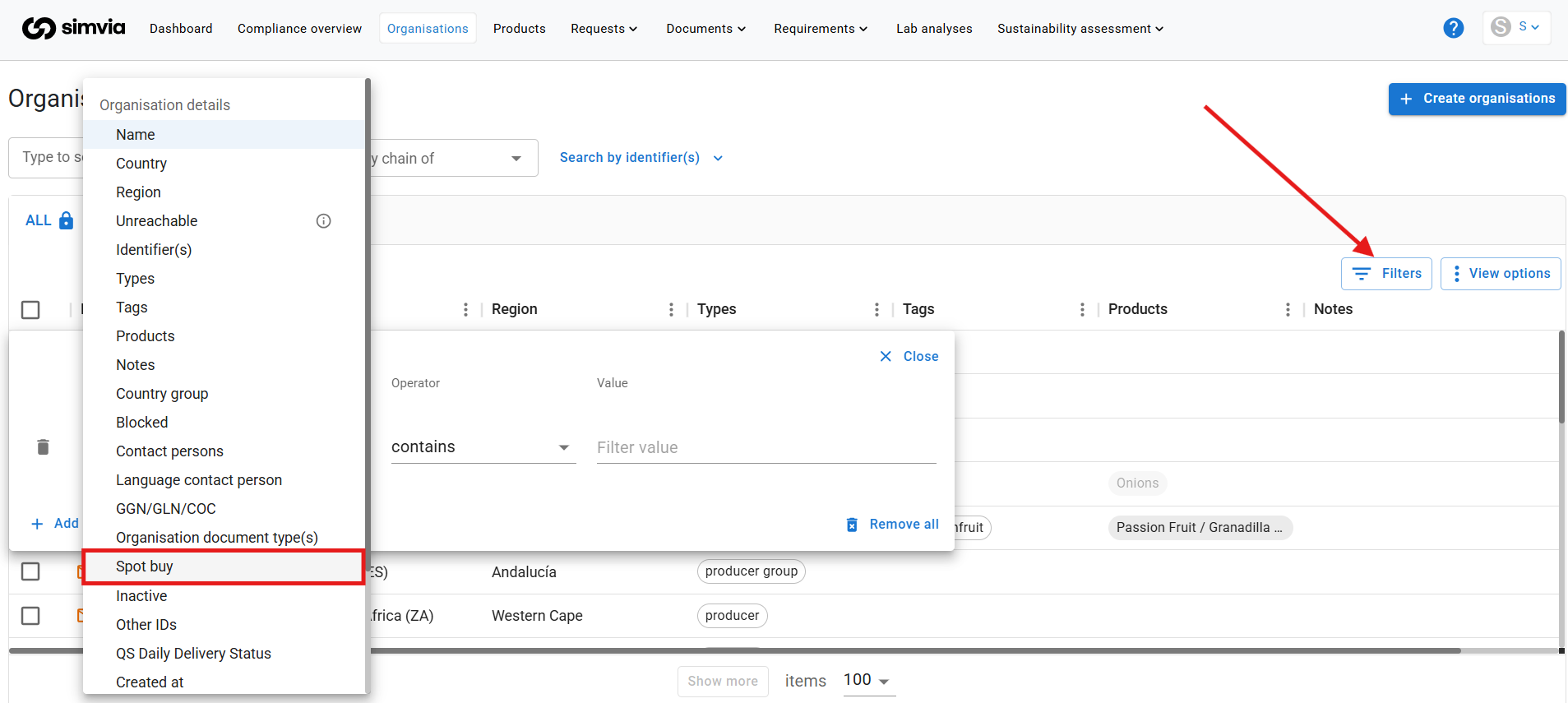
- Are only visible when filtering on *Spot buy
*
---
### When to use Spot Buy
Use Spot Buy when:
- You work with a supplier only once
- You need to store a document for reference
- You do not want ongoing compliance tracking
This keeps your main supplier list clean and focused on active partnerships.
---
### What happens when you mark an organisation as Spot Buy?
If you convert an existing organisation to Spot Buy, the system will automatically:
1. Convert all related documents into Spot Buy documents
- You will first see a confirmation pop-up listing the affected documents.
2. Remove all requirement rules for that organisation
- Spot Buy organisations should not generate automatic requests.
3. Automatically label all future documents for this organisation as Spot Buy
---
### Reviewing Spot Buy documents
When reviewing a Spot Buy request:
- The order reference is automatically added to the document.
- The “Spot Buy document” toggle is enabled by default.
- The “About” field is optional to simplify the process.
---
### Important
Spot Buy organisations are hidden from your standard organisation view unless you apply the **Spot Buy filter**.
This ensures that temporary suppliers do not interfere with your regular compliance monitoring.
- [Getting Started](https://helpcenter.simvia.com/knowledge-base/getting-started?hsLang=en#main-content)
- [About Simvia](https://helpcenter.simvia.com/knowledge-base/getting-started?hsLang=en#about-simvia)
- [Navigating the Platform](https://helpcenter.simvia.com/knowledge-base/getting-started?hsLang=en#navigating-the-platform)
- [Account & Access](https://helpcenter.simvia.com/knowledge-base/getting-started?hsLang=en#account-access)
- [Supply Chain Approval (SCA)](https://helpcenter.simvia.com/knowledge-base/supply-chain-approval-sca?hsLang=en#main-content)
- [Dashboard](https://helpcenter.simvia.com/knowledge-base/supply-chain-approval-sca?hsLang=en#dashboard)
- [Compliance Overview](https://helpcenter.simvia.com/knowledge-base/supply-chain-approval-sca?hsLang=en#compliance-overview)
- [Organisations](https://helpcenter.simvia.com/knowledge-base/supply-chain-approval-sca?hsLang=en#organisations)
- [Products](https://helpcenter.simvia.com/knowledge-base/supply-chain-approval-sca?hsLang=en#products)
- [Requests](https://helpcenter.simvia.com/knowledge-base/supply-chain-approval-sca?hsLang=en#requests)
- [Documents](https://helpcenter.simvia.com/knowledge-base/supply-chain-approval-sca?hsLang=en#documents)
- [Requirements](https://helpcenter.simvia.com/knowledge-base/supply-chain-approval-sca?hsLang=en#requirements)
- [PPWR](https://helpcenter.simvia.com/knowledge-base/ppwr?hsLang=en)
- [Sustainability Risk Assessment (SRA)](https://helpcenter.simvia.com/knowledge-base/sustainability-risk-assessment-sra?hsLang=en)
- [Connections](https://helpcenter.simvia.com/knowledge-base/connections?hsLang=en#main-content)
- [Certification Databases](https://helpcenter.simvia.com/knowledge-base/connections?hsLang=en#certification-databases)
- [Laboratory Integrations](https://helpcenter.simvia.com/knowledge-base/connections?hsLang=en#laboratory-integrations)
- [Updates](https://helpcenter.simvia.com/knowledge-base/updates?hsLang=en#main-content)
- [Release Notes 2026](https://helpcenter.simvia.com/knowledge-base/updates?hsLang=en#release-notes-2026)
- [Release Notes 2025](https://helpcenter.simvia.com/knowledge-base/updates?hsLang=en#release-notes-2025)
[](https://www.simvia.com/)
Copyright © 2026, Simvia