
This article gives you a tour of where PPWR compliance work happens in Simvia. If you are new to PPWR itself, start with Introduction to PPWR first, that article covers what the regulation requires. This one shows you where to find things in the platform.
Before you start Make sure you know your role under PPWR, manufacturer, importer or distributor, since this determines which parts of Simvia are most relevant to you.
Your dashboard and main navigation
When you log in, you land on your Dashboard. From here, the navigation bar gives you access to everything you need for PPWR compliance.
The sections most relevant to PPWR are:
- Products - where your SKUs, packaging units, and packaging components live. This is where you organise your packaging hierarchy. And send requests.
- Requests - where you track packaging data requests to your suppliers.
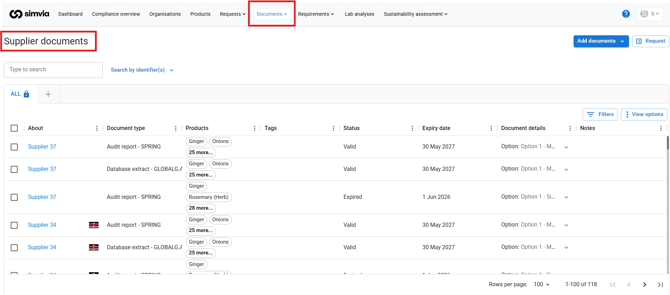
- Documents - where technical documentation, specifications, and certificates are stored.
- Compliance overview - a summary view of your conformity status across your product portfolio.
Organising your packaging hierarchy
Before you can request data or generate a Declaration of Conformity, your products need to be organised into their packaging hierarchy: SKU, packaging unit, and packaging component.
To add your products, see Add a product, or Add products in bulk to add several at once and build the hierarchy in one upload.
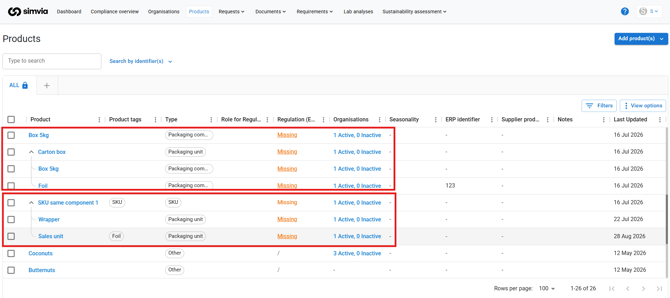
This is the first practical step for most new users. We cover it in detail in How to Organise Your Packaging Hierarchy in Simvia.
Requesting data from suppliers
Once your hierarchy is set up, you can request the missing packaging data directly from your suppliers. Simvia groups the request by supplier, so each one only receives what is relevant to the components they provide.
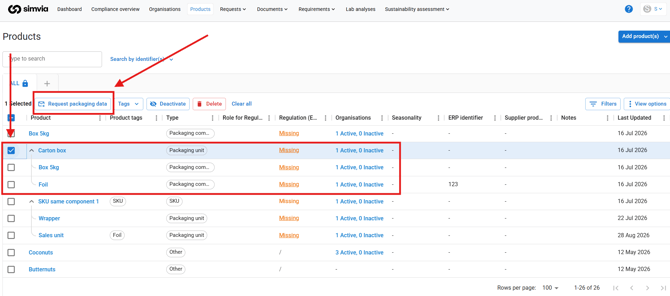
If you are on the receiving end of a request, see How to Respond to a PPWR Packaging Data Request for what happens next.
Storing and tracking documentation
Every component's technical file, specifications, test reports, and certificates are kept in Documents. This is also where the evidence required under PPWR is stored, so it stays organised and audit-ready.
Running conformity checks
Simvia checks your data against PPWR requirements automatically and flags what is missing or non-compliant, so you know what still needs attention before you can create a Declaration of Conformity.
Where to go next- If you manufacture or import packaged products, start with organising your packaging hierarchy, then move on to requesting data from suppliers.
- If you are a supplier, start with responding to packaging data requests.
Recap
Simvia supports your PPWR compliance by helping you organise your packaging hierarchy, request data from suppliers, store your technical documentation, and run conformity checks, so you always know where you stand.
See it in action
Want a visual walkthrough? Our Strategic Account Executive Sander Frericks recorded a short tour of the Simvia platform, covering the sections in this article.
Need more support? If you have questions about getting started, reach out to our support team.